


Dapper vs EF Core: Improving API Performance with PIT Solutions - How a Hybrid Dapper–EF Core Approach Supercharged Our API Performance
How PIT Solutions Enhanced API Performance Using Dapper and EF Core
PIT Solutions optimized high-throughput APIs by blending EF Core’s efficiency with Dapper’s speed—achieving up to 60% faster execution and reduced memory usage through a balanced hybrid architecture.
At PIT Solutions, we run APIs that serve thousands of requests per second. Over time, we started noticing subtle but consistent performance bottlenecks — particularly in APIs making repetitive, high-volume database calls.
Most of these services used Entity Framework Core (EF Core) for data access. While EF Core’s abstraction and LINQ-based querying were excellent for productivity, we realized they came with a measurable performance cost in certain hot paths.
We decided to experiment with Dapper, a lightweight micro-ORM, in these critical sections — and the results were worth the effort.
EF Core Performance Issues in High-Throughput APIs
EF Core’s convenience comes with:
- Extra CPU usage from LINQ translation to SQL.
- Higher memory allocations from tracking entities.
- Slower execution in simple read/write scenarios compared to direct SQL
In our most used endpoints — fetching and updating small data sets repeatedly — these overheads added up:
- Queries that should take 1–2 ms took 4–6 ms under load.
- Under peak traffic, this slowed down the entire service pipeline.
When to Replace EF Core with Dapper
- API bottlenecked by DB operations: Microservices experiencing high latency due to ORM mediation.
- Large-scale batch operations: Bulk imports/exports demand raw SQL and performance tuning.
- High-frequency endpoints: Hot paths that see thousands of requests per second.
Why Choose Dapper for High-Performance APIs
- Performance: Dapper executes raw SQL directly and maps results without the heavy abstraction layer found in EF. This typically results in lower latency and higher throughput—crucial for APIs handling thousands of requests per second.
- Control: Developers have full command over queries, indexes, stored procedures, and execution plans, which allows deep optimization for hot paths.
- Lightweight: Minimal dependencies and rapid startup reduce resource consumption for each microservice and database interaction.
Dapper Migration Strategy at PIT Solutions
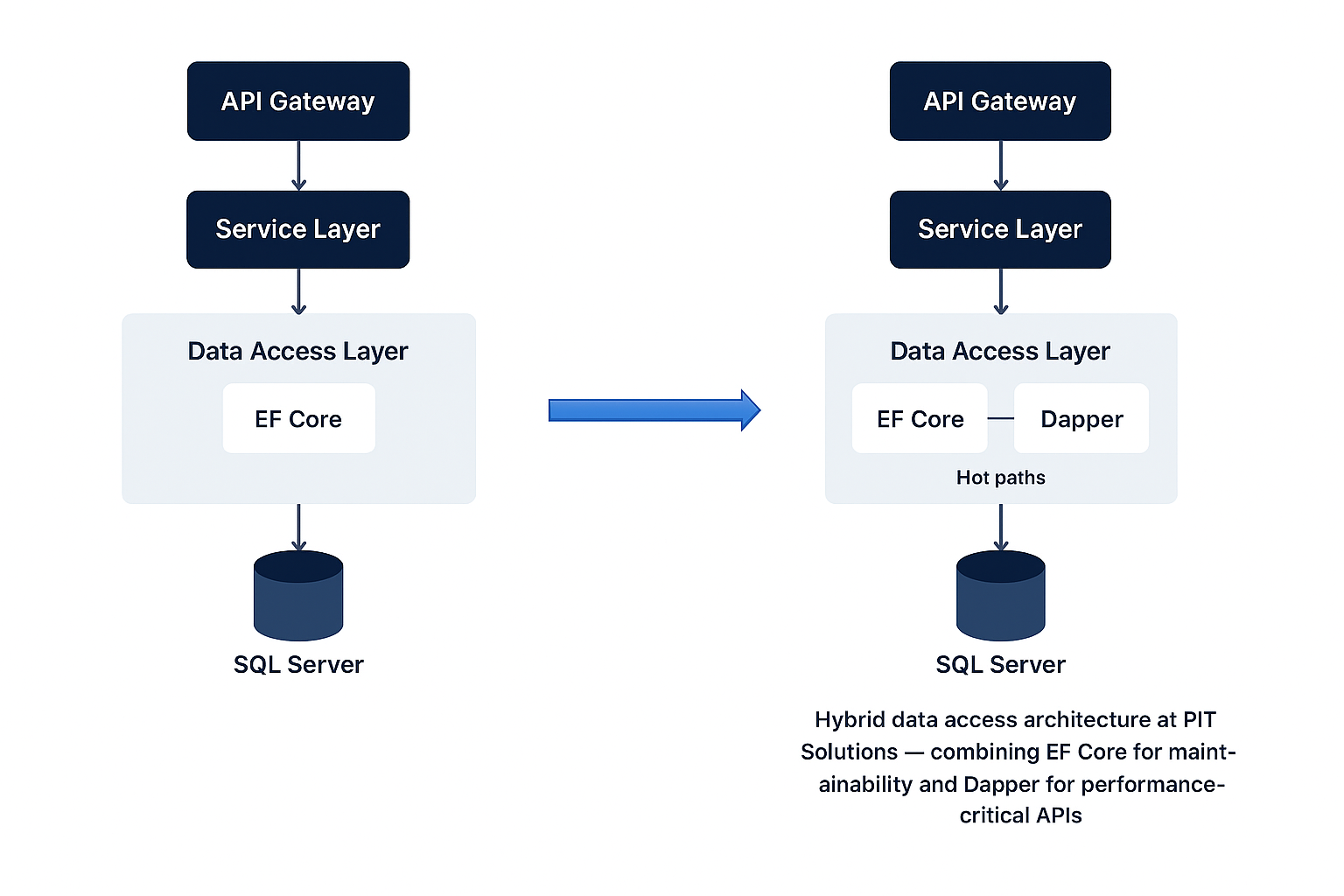
At PIT Solutions, our team didn’t rip out EF Core entirely. Instead, we hybridized our approach:
1. Profiling and Auditing Existing APIs
Start by identifying endpoints where EF-generated SQL is slow. Use profiling tools such as Application Insights, SQL Server Profiler, or MiniProfiler:
“We found that our /orders/{id} endpoint spent 1,500ms on database fetches, mainly due to N+1 queries and excessive JOINs triggered by EF navigation properties.”
2. Dapper Setup and Integration
Install Dapper via NuGet for your .NET project:

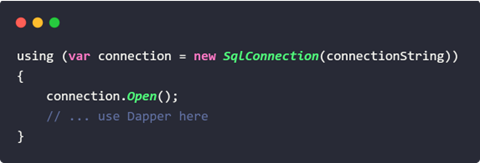
Establish your database connection (using SqlConnection for SQL Server):
3. Refactoring Data Access Layer
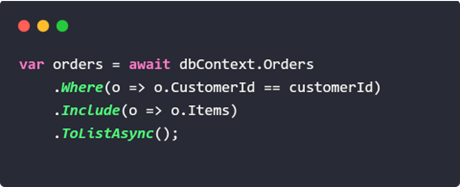
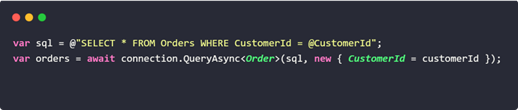
Convert high-traffic LINQ queries to explicit SQL:
EF Core example:
Dapper equivalent:
For related items, fetch separately
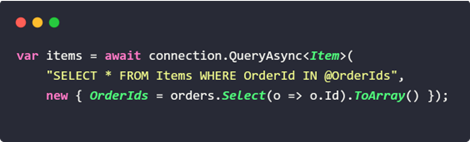
Batch Inserts and Bulk Operations:
Dapper allows you to execute raw SQL for batch actions, which EF Core struggles with for very large datasets.
4. Addressing Change Tracking and Migrations
- EF Core: Handles entity state management and automatic migrations.
- Dapper: You’ll need explicit SQL for tracking changes; consider using simple repository patterns if necessary. Use tools like FluentMigrator or DbUp for schema changes.
5. Before and After: Performance Gains
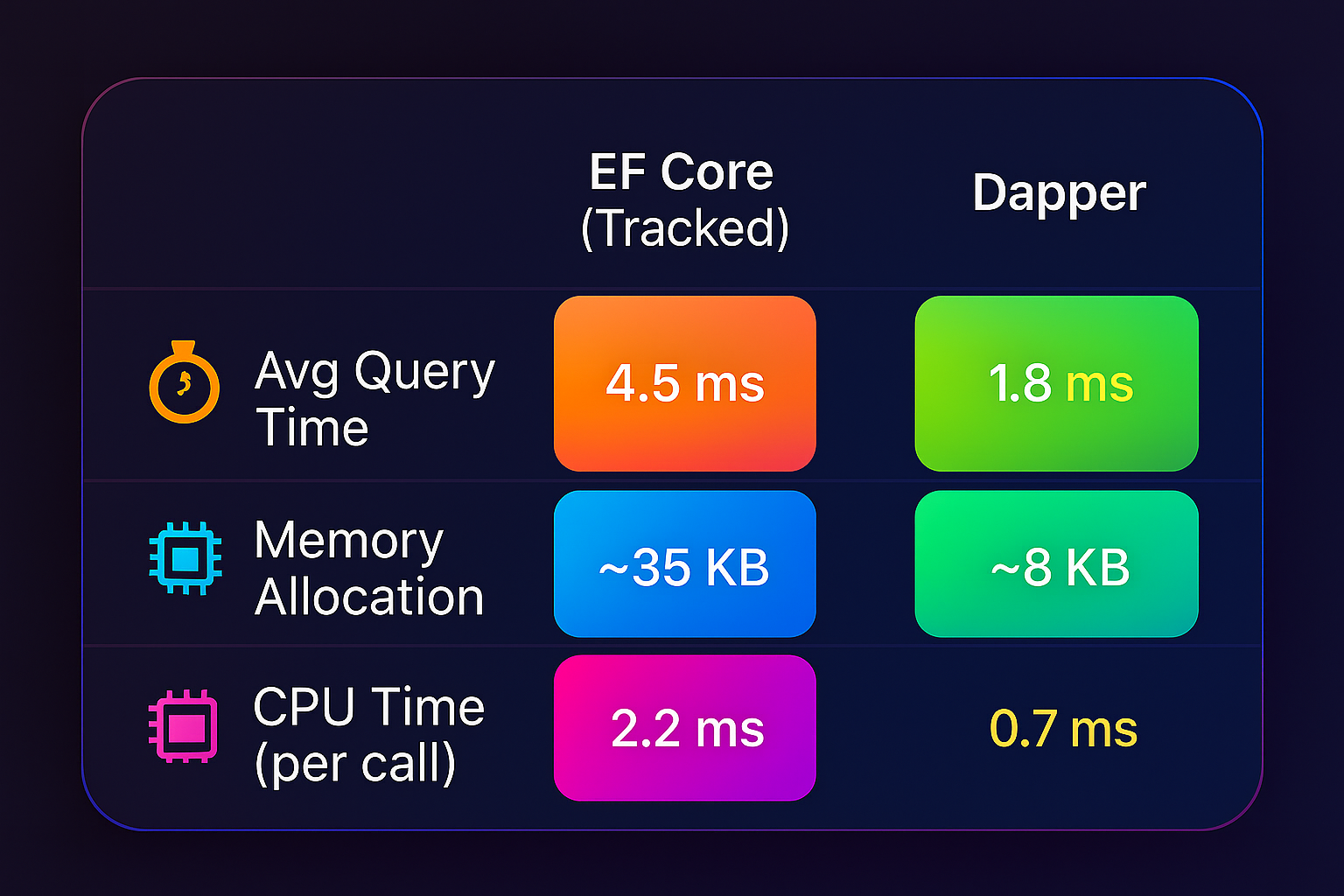
On endpoints with 1M+ daily calls, this translated to:
- 60% faster execution
- ~70% less memory allocation
- Reduced GC pressure
6. Incremental Rollout and Hybrid Approach
- Start with the bottlenecks: Only migrate endpoints where performance improvements justify added complexity.
- Maintainability: Continue using EF Core for complex domain models, low-throughput endpoints, and areas that benefit from productivity over microsecond-level speed.
Dapper vs EF Core: Key Lessons Learned
- Dapper is not a silver bullet — use it where raw performance matters most.
- Keep EF Core for:
- Migrations
- Complex relationships
- Scenarios where change tracking is beneficial
- Avoid embedding SQL in multiple places — centralize queries to keep maintainability.
Conclusion
By strategically replacing EF Core with Dapper in our high-throughput APIs, we achieved significant performance gains without sacrificing developer productivity.
The takeaway? You don’t have to choose between developer happiness and raw speed — sometimes, the best answer is a smart hybrid.
At PIT Solutions, we help enterprises optimize APIs with EF Core and Dapper.
“Looking to optimize your APIs for performance and scalability? Contact PIT Solutions to discover how we can help.”