



Understanding Amazon SES and SNS in Simple Terms
In today’s digital-first world, email remains one of the most important communication channels for businesses. From password resets and order confirmations to invoices, alerts, and promotional campaigns, organizations rely heavily on email to engage and inform their customers.
But sending thousands or even millions of emails reliably is not as simple as it seems. Ensuring delivery, avoiding spam filters, maintaining sender reputation, and monitoring performance require a robust system.
This is where Amazon Simple Email Service (SES) and Amazon Simple Notification Service (SNS) come together to provide a scalable and dependable solution.
In this article, we will explain how these services work and why they matter for your business.
What is Amazon SES?
Amazon SES (Simple Email Service) is a cloud-based email platform provided by Amazon Web Services (AWS) that enables businesses to send and receive emails using their own domains. It offers a secure, scalable, and cost-effective solution for delivering large volumes of transactional and marketing emails efficiently.
Think of Amazon SES as a professional digital post office that helps companies send emails safely, quickly, and reliably.
Businesses commonly use Amazon SES for:
- Account verification emails
- Password reset emails
- Order confirmations
- Payment receipts
- Promotional emails
- Notifications and alerts
Amazon SES is designed to ensure high deliverability while protecting sender reputation.
Benefits:
Building a large-scale email solution is often a complex and costly challenge for a business. You must deal with infrastructure challenges such as email server management, network configuration, and IP address reputation. Additionally, many third-party email solutions require contract and price negotiations, as well as significant up-front costs. Amazon SES eliminates these challenges and enables you to benefit from the years of experience and sophisticated email infrastructure Amazon.com has built to serve its own large-scale customer base.
Why Do Businesses Need Amazon SES?
Sending emails is not as simple as it looks.
If a company sends too many emails incorrectly:
- Emails may go to spam
- Email accounts may get blocked
- Customers may never receive important messages
Amazon SES helps by:
- Ensuring emails are delivered properly
- Reducing the chance of emails going to spam
- Managing large volumes of emails
- Keeping track of delivery status
It helps companies maintain a good email reputation.
How Amazon SES Works
Here’s the basic flow:
- Your application sends an email request via:
- SMTP
- AWS SDK
- SES API
- Amazon SES processes and delivers the email.
- SES tracks delivery status.
- Events (bounce, complaint, delivery) can be sent to SNS.
SES Email Sending Methods
Applications can integrate with Amazon SES using popular programming languages such as:
- Node.js
- Python (Boto3)
- Java
- .NET
Example (Python – Boto3):
    import boto3
    ses = boto3.client('ses', region_name='us-east-1')
    response = ses.send_email(
        FromEmailAddress: 'sender@example.com',
        Destination: {'ToAddresses': ['recipient@example.com']},
        Message: {
            'Subject': {'Data': 'Test Email'},
            'Body': {
                'Text': {'Data': 'Hello from Amazon SES'}
            }
        }
    )
What Happens After an Email is Sent?
Let’s say a company sends you an email using Amazon SES.
Three things can happen:
- The email is delivered successfully.
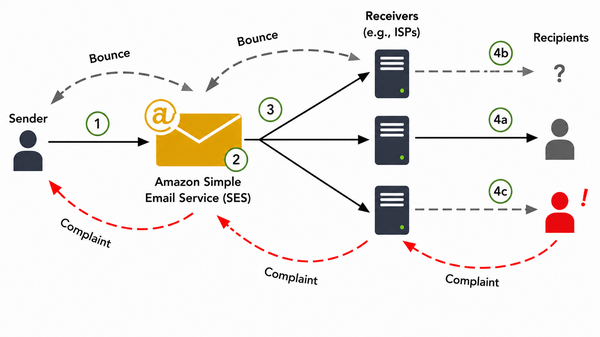
- The email “bounces” (wrong or invalid email address).
- The recipient marks it as spam (complaint).
Now here’s where Amazon SNS becomes important.
What is Amazon SNS?
Amazon SNS (Simple Notification Service) is a managed messaging service that sends real-time notifications.
When integrated with Amazon SES, SNS informs businesses about what happens after an email is sent. For example:
- If an email is delivered
- If it bounces
- If a recipient reports it as spam
These real-time alerts allow organizations to take immediate action.
Why Integrate SES with SNS?
When sending emails, not all emails succeed.
Some events include:
- Bounce (invalid email)
- Complaint (user marks email as spam)
- Delivery
- Reject
- Rendering failure
To track and handle these events automatically, SES integrates with SNS.
How Amazon SES and SNS Work Together
When Amazon SES is integrated with Amazon SNS, businesses gain visibility into their email performance.
Here’s a simplified flow:
- A business application sends an email through Amazon SES.
- Amazon SES delivers email.
- SES monitors the delivery status.
- If an issue occurs (such as a bounce or complaint), Amazon SNS sends an automated notification.
This enables businesses to:
- Remove invalid email addresses
- Preventing repeated failed delivery attempts
- Protect sender reputation
- Maintain compliance with email best practices
Without SNS, the company might never know that emails are failing.
SES and SNS Integration Architecture
Here’s how it works:
- The application sends an email via Amazon SES.
- Amazon SES attempts to deliver the email.
- SES tracks the delivery result (such as successful delivery, bounce, or complaint).
- If any event occurs, SES sends that information to Amazon SNS.
- Amazon SNS then sends automated notifications to the business system, allowing it to take immediate action if required.
How to Configure SES with SNS
Setting up Amazon SES with SNS involves a few important steps to ensure secure and reliable email delivery.
Step 1: Verify Your Domain or Email Address
Before sending emails through Amazon SES, you must verify your domain or email address. This confirms that you are authorized to send emails from that domain.
As part of this process, Amazon requires you to add SPF and DKIM records to your domain’s DNS settings.
What Are SPF and DKIM?
- SPF (Sender Policy Framework) verifies that Amazon SES is allowed to send emails on behalf of your domain.
- DKIM (DomainKeys Identified Mail) adds a digital signature to your emails to prove they were not altered in transit.
Why Do They Matter?
SPF and DKIM are critical because:
- They improve email deliverability.
- They reduce the chances of emails being marked as spam.
- They protect your domain from email spoofing.
- They strengthen your domain reputation with email providers like Gmail and Outlook.
In simple terms, SPF and DKIM help email providers trust your emails — increasing the likelihood that they land in the inbox rather than the spam folder.
Step 2: Create SNS Topic
An SNS topic acts as a communication channel where email delivery events are sent.
You create a topic in Amazon SNS to receive notifications about events such as:
- Email delivery
- Bounce
- Complaint
This topic becomes the central place where SES sends updates.
Step 3: Subscribe to SNS Topic
Once the topic is created, you need to define how your system will receive these notifications.
You can choose to receive notifications via:
- Email alerts
- A secure system endpoint (webhook)
- Automated processing services
- A message queue for later processing
This ensures your system is informed whenever an email event occurs.
Step 4: Configure Event Publishing in SES
Finally, you configure Amazon SES to send delivery events to the SNS topic.
You can choose which events you want to monitor, such as:
- Successful delivery
- Bounce
- Complaint
Once configured, SES will automatically notify SNS whenever one of these events occurs.
Why This Configuration Is Important
This setup ensures that:
- Your emails are authenticated and trusted.
- You maintain a strong sender reputation.
- You receive real-time updates about email performance.
- You can take immediate action if issues arise.
Benefits of Integrating Amazon SES with SNS
Some of the key benefits are:
- Automated bounce handling
- Protects sender reputation
- Improves deliverability
- Scalable
- Cost-effective
- Real-time event monitoring
When to Use Amazon SES with SNS
Use it when:
- You send transactional emails
- You manage large user bases
- You want automated bounce handling
- You need scalable cloud email service
- You want event-driven email tracking
Compliance, Data Protection & Responsible Email Practices
When sending emails at scale, businesses must ensure compliance with data protection regulations and responsible communication standards.
GDPR and Data Protection Considerations
For organizations operating in Europe or serving EU customers, compliance with GDPR (General Data Protection Regulation) is essential.
When using Amazon SES
- Customer data must be handled securely.
- Email recipients must have provided proper consent (especially for marketing emails).
- Personal data should only be stored and processed for legitimate business purposes.
- Businesses must provide unsubscribe options where required.
Amazon SES provides a secure infrastructure, but compliance ultimately depends on how businesses collect and manage customer data.
Important Note on Cold Emails
Using Amazon SES for cold outreach (unsolicited emails) must be handled carefully.
- Sending emails without consent can violate GDPR and anti-spam laws.
- High complaint rates from unsolicited emails can damage your sender reputation.
- Excessive complaints may lead to account restrictions.
Businesses should always follow applicable regulations and obtain proper consent before sending marketing communications.
SES Sandbox vs Production Mode
This is an important topic often overlooked.
Sandbox Mode (Default)
When you first create an SES account:
- You can only send emails to verified addresses.
- Sending limits are very low.
- Intended for testing purposes.
Production Mode
Once AWS approves your request:
- You can send emails to any valid recipient.
- Higher sending limits.
- Suitable for live business operations.
To move to production, you must request access and explain your email use case to AWS.
This approval process ensures responsible email usage and protects the AWS ecosystem.
Dedicated IP vs Shared IP – What Businesses Should Know
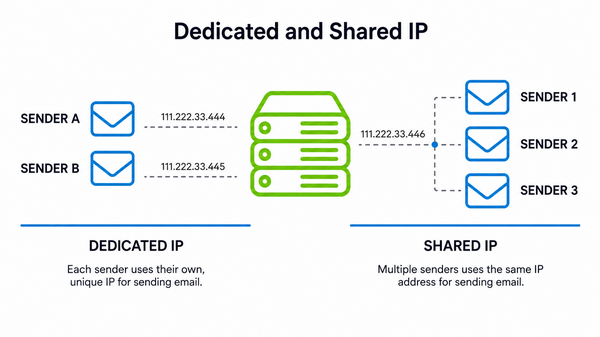
Amazon SES offers two types of IP configurations:
Shared IP (Default Option):
- Multiple senders use the same IP address.
- Suitable for low to moderate email volumes.
- Cost-effective option.
However, reputation is shared. If another sender misuses the IP, it may affect overall deliverability.
Dedicated IP (Recommended for High Volume Senders):
- The IP address is used exclusively by your organization.
- You control your sender reputation.
- Other senders cannot impact your deliverability.
- Ideal for enterprises and businesses sending large volumes of emails.
Dedicated IPs come at an additional cost but provide greater control and stability for high-volume operations.
For businesses where email communication is mission-critical, a dedicated IP is often the preferred choice.
Monitoring Reputation & Performance Metrics
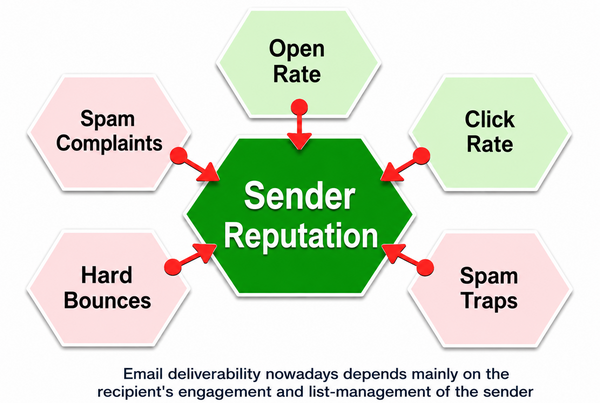
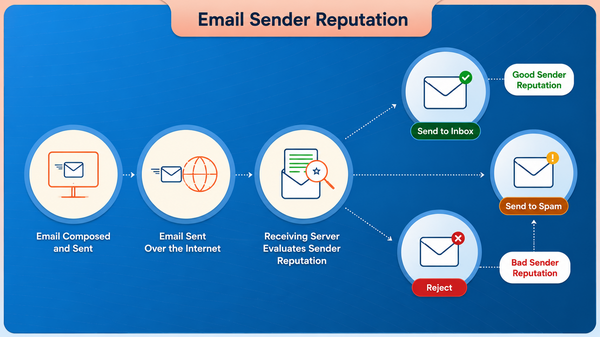
Amazon SES provides a Reputation Dashboard and detailed metrics to monitor email health.
Key metrics include:
- Bounce Rate
- Complaint Rate
- Delivery Rate
- Sending Quota
- Reputation Status
Monitoring these metrics is essential for maintaining account health.
Important Thresholds Businesses Should Know
- If the bounce rate exceeds 5%, AWS may temporarily pause or review your account.
- If the complaint rate exceeds 0.1%, it can significantly impact your sender reputation.
High bounce or complaint rates indicate poor email list quality or non-consented recipients. Maintaining clean email lists and following best practices is critical.
Regular monitoring helps businesses:
- Protect domain reputation
- Avoid account suspension
- Improve inbox placement
- Maintain customer trust
Why This Matters for Enterprises
For high-volume or enterprise-level senders, email is a core communication channel. Poor deliverability or compliance issues can lead to:
- Lost revenue
- Customer dissatisfaction
- Brand damage
- Regulatory penalties
By properly configuring SES, monitoring reputation metrics, choosing the right IP setup, and following data protection regulations, businesses can ensure stable and compliant email operations.
Pricing Overview
Amazon SES follows a pay-as-you-go model.
You are charged based on:
- Number of emails sent
- Data transfer usage
- Dedicated IP (if used)
For latest pricing details, refer to:
https://aws.amazon.com/ses/pricing/
Compared to maintaining in-house email servers, SES is significantly more cost-efficient and scalable.
Limitations & Considerations
While Amazon SES is powerful, businesses should be aware of certain limitations:
1. Initial Sandbox Restrictions
- You must request production access before scaling.
2. Reputation Management Responsibility
- AWS provides tools, but businesses must maintain clean email lists and compliance.
3. Cold Email Risks
- Increase complaint rates
- Damage reputation
- Lead to account suspension
4. Dedicated IP Cost
- Enterprise features like Dedicated IP come with additional costs.
5. Setup Complexity
- Initial DNS configuration (SPF, DKIM, DMARC) may require technical expertise.
- Working with experienced implementation partners can simplify this process.
About Our Expertise
At Webshopextensions https://www.webshopextension.com/en/#category=odoo, we offers comprehensive Odoo services including implementation, customization, integration, and support. We help businesses of all sizes streamline operations with Odoo's powerful, user-friendly ERP platform.
For assistance with installation, please reach out to us at support@webshopextension.com. We're here to help!
Conclusion
Effective customer communication is a cornerstone of modern business success. Amazon SES ensures that emails are delivered securely and efficiently, while Amazon SNS provides the real-time visibility needed to maintain performance and reputation.
Together, these services create a scalable, automated, and reliable email communication system that supports business growth and enhances customer trust.
By leveraging Amazon SES with SNS integration, organizations can streamline communication processes, improve deliverability, and build a stronger digital presence.
Why Choose PIT Solutions for Odoo AWS Integration
PIT Solutions specializes in Odoo integrations and helping businesses improve email deliverability and automation. Our ready-to-use Amazon SES Plugin for Odoo enables seamless integration with Amazon SES and SNS for reliable email delivery and event tracking.
Explore our Amazon SES Plugin for Odoo: https://www.webshopextension.com/en/odoo-amazon-ses-plugin-v19
Official References
For readers who would like to explore further technical documentation, here are official resources:
- Amazon SES Documentation: https://docs.aws.amazon.com/ses/
- Amazon SNS Documentation: https://docs.aws.amazon.com/sns/
- Amazon SES Pricing: https://aws.amazon.com/ses/pricing/
- AWS Reputation Dashboard Overview: https://docs.aws.amazon.com/ses/latest/dg/reputation-dashboard.html