


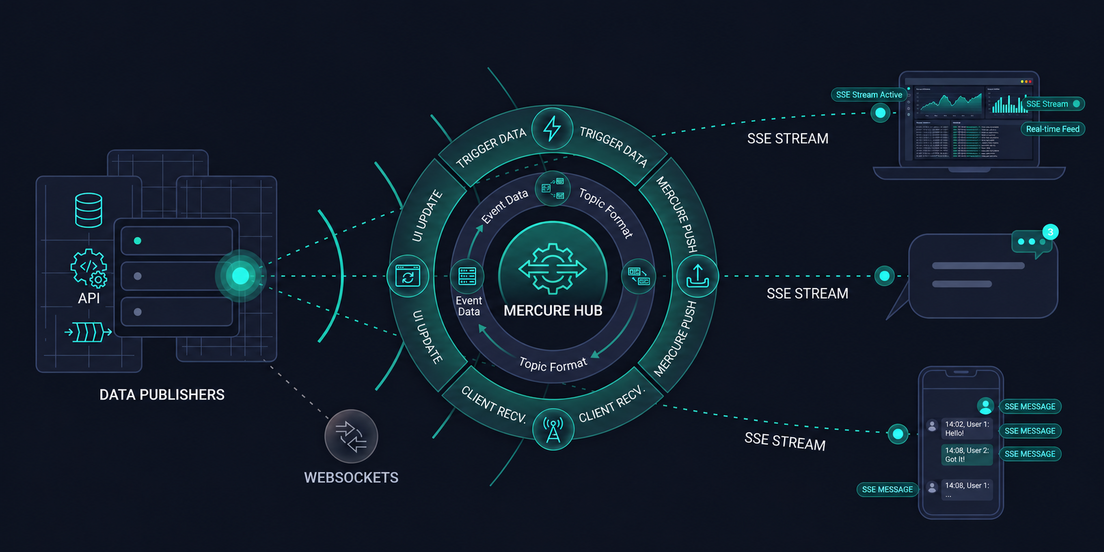
I was recently tasked, here at PIT Solutions, with building a page that generates a PDF report: one the user can either download or have it emailed to them. I started the obvious way; generate the report on form submit, show a little spinner, done. It worked fine in my early tests. Then I hit a wall; once the underlying data got large, submitting the form just went quiet. No progress, no feedback, nothing. I had no way to tell if it was still working, stuck, or had already failed silently somewhere in the background.
That awkward, silent gap between "I clicked the button" and "something happened" turned out to be genuinely annoying - this post is about how I closed it, using a combination of Event-Driven Architecture (EDA) and Mercure to build real-time web applications.
What Are Real-Time Applications?
A real-time application is one where the interface updates the moment something changes on the server, without the user refreshing the page or waiting on a response to catch up. Live chat, delivery tracking, stock tickers, collaborative docs - different products, same idea: something happens, and whoever's watching finds out instantly, not on their next click. That's the piece my PDF export was missing, and it's what the rest of this post is actually about building.
The Challenge: Keeping Users Updated During Long-Running Tasks
Why Traditional Request-Response Falls Short
Here's what was actually happening behind that spinner. My export endpoint was doing everything in one shot: receive the request, query the data, build the PDF, and only then send a response back. For small reports, that whole round trip finished before I even noticed the spinner. For large ones, the request just sat there -blocking, silent- for however long generation took. If it ran long enough to hit a timeout, I'd get a failure the user was never actually told about.
Why Polling Is Not Always the Best Solution
My first instinct to "fix" this was the equally obvious next step: keep each request short, but have the browser check back in every few seconds - call an endpoint, ask "is it done yet?", and if not, ask again in three seconds. This is polling, and it does work. But the costs showed up almost immediately:
- Most of those "is it done?" requests came back with nothing new to report; wasted round trips, wasted server load.
- There was always a lag between the job actually finishing and the browser noticing, since it only found out the next time it happened to ask.
- It didn't scale gracefully. A handful of users polling every few seconds is fine; a few hundred is a self-inflicted denial-of-service.
What I actually needed wasn't a smarter polling interval -- it was flipping the direction entirely. Instead of my browser repeatedly asking, the server should just say something the moment there was something worth saying. That's the shift that sent me toward Event-Driven Architecture.
Breaking My Backend Into Events
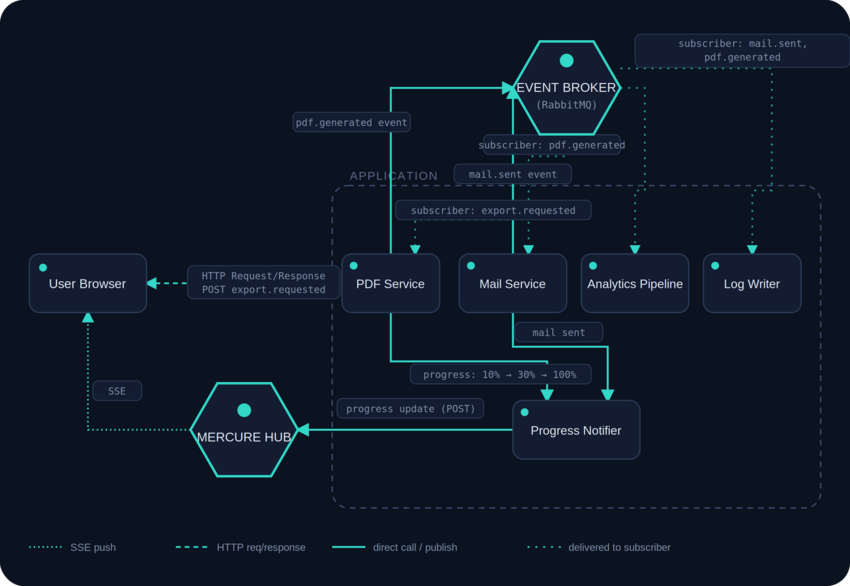
Instead of treating "export to PDF" as one long, blocking task, I broke it into a chain of small, independent moments "events" each representing something that had just happened:
- The user clicks Export. My app immediately accepts the request and fires off an export.requested event - it doesn't make the user wait for the PDF to be done, just for the request to be received.
- A dedicated PDF service picks up that event and starts working, periodically announcing progress: 10% – Starting…, 30% – Generating…, and so on.
- Once it's finished, it emits pdf.generated event.
- A mail service, listening for exactly that event, picks it up, sends the email, and emits mail.sent once delivered.
- A separate little service - I called it the Progress Notifier - listens to all of these events, and its only job is pushing live updates to the browser so the progress bar actually moves.
No single service needs to know about the others. My PDF generator doesn't know or care that a mail service exists - it just announces what happened and moves on. This is the heart of Event-Driven Architecture: small, decoupled pieces that publish and react to events, rather than calling each other directly and waiting on the answer.
Once I saw it this way, I noticed the same pattern shows up everywhere: live chat, delivery tracking, collaborative documents, stock tickers. Different domains, same shape - something happens, interested parties get told about it, no one sits around asking.
A quick note for the curious: these events don't just float in the air. They're routed by an event broker (like RabbitMQ or Apache Kafka) that makes sure the right consumers hear about the right events. In my Symfony app, I used Symfony Messenger to organize this - though it's worth being precise about what it actually is: a message bus abstraction, not a broker itself. It gives you a clean, consistent API for dispatching and handling messages, and you plug an actual transport (like a queue or RabbitMQ) in underneath it.
From Polling to Event-Driven Real-Time Applications
Fixing the backend was only half the story. RabbitMQ and friends are great at getting events from one backend service to another; but none of that reaches the browser on its own. There's still a gap between "the server knows something happened" and "the progress bar on the screen actually moves."
This is a genuinely different problem, and here's how I weighed the classic options.
Long Polling
The old middle ground. The browser asks a question, but instead of answering right away, the server holds the line open and waits until it actually has something to say. It's better than plain polling, but every response still means the browser has to immediately ask again to keep listening.
WebSockets
A full upgrade of the connection into a persistent, two-way pipe. Great when the browser and server both need to talk constantly and instantly - think multiplayer games or a shared whiteboard where every stroke matters. The cost is that my server would have to hold that connection open itself, for as long as the user stuck around, which felt like a much bigger operational commitment than I wanted for a PDF export.
Server-Sent Events (SSE)
The quiet, unassuming option that's been having a bit of a renaissance lately (it's a natural fit for streaming AI responses token-by-token, for instance). It's just a plain HTTP request asking for a text/event-stream, kept open while the server writes plain-text events to it as they happen. It only flows one way -server to browser- but for my PDF progress bar, that's exactly all I needed. Nothing needed to go back over that channel; the browser just wanted to be told.
For my export, the choice was easy: nothing about "tell me my PDF's progress" required the browser to talk back over the same channel. That pointed straight at SSE. The question was how to run it without reinventing reconnection logic, authorization, and message history myself; which is exactly where Mercure came in.
What Is Mercure?
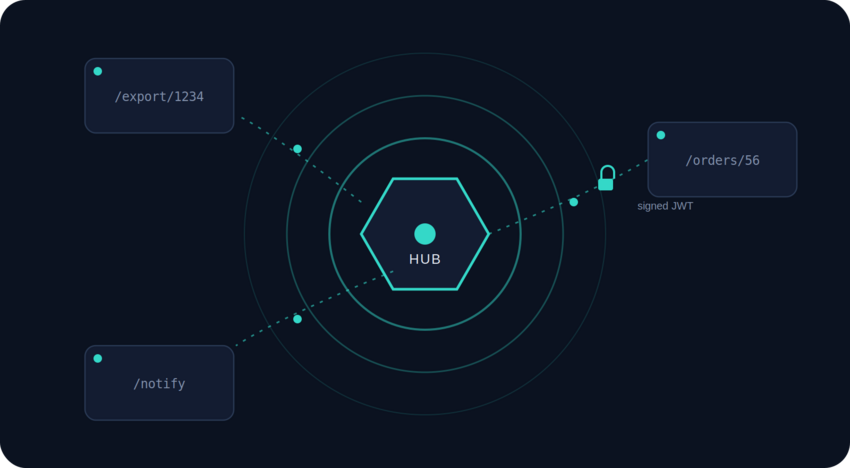
Mercure is a free, open protocol that takes plain SSE and quietly fixes the parts I'd otherwise have had to build myself. Instead of my app managing long-lived connections directly, it publishes updates to a small, dedicated Mercure Hub, and the hub takes care of actually holding those connections open and delivering messages to whoever's subscribed.
A few things it added on top of raw SSE that made the decision easy:
- Topics. Updates go out on a topic - say, /reports/1234 - and a browser subscribes to that exact topic, or to a pattern like /reports/{id} to follow a whole category of resources.
- Authorization, built in. Publishing always requires a signed JWT scoped to the topics being written to. Subscribing needs one too, unless the hub is deliberately configured to let anonymous clients read public topics.
- Catch-up on reconnect. Combined with SSE's Last-Event-ID, a browser that briefly drops offline (a tunnel, a flaky wifi handoff) can reconnect and get caught up on whatever it missed, automatically.
- No socket to babysit. Because my app never holds the connection open itself - it just tells the hub "publish this" and moves on - this fit naturally into PHP's request/response lifecycle, without needing a long-running process of my own.
How I build Real-Time Updates with Mercure in Symfony
Here's the whole loop I ended up with, using Symfony, from "the PDF service made progress" to "the browser knows."
1. Install the Mercure Bundle
composer require symfony/mercure-bundle
2. Configure the Mercure Hub
in config/packages/mercure.yaml:
mercure:
    hubs:
        default:
            url: '%env(MERCURE_URL)%'
            public_url: '%env(MERCURE_PUBLIC_URL)%'
            jwt:
                secret: ‘%env(MERCURE_JWT_SECRET)%’
3. Publish Updates
use Symfony\Component\Mercure\HubInterface;
use Symfony\Component\Mercure\Update;
class ReportController extends AbstractController
{
    public function generate(HubInterface $hub, Report $report): Response
    {
        // ...kick off the PDF generation job here...
        $update = new Update(
            "/reports/{$report->getId()}",
            json_encode(['status' => 'generating', 'progress' => 10]),
            private: true // requires a valid subscriber JWT for this topic
        );
        $hub->publish($update);
        return new Response('', 202); // accepted, not finished
    }
}
The PDF service publishes an Update like this each time it has real progress to report 30, 60, 100 right from wherever that progress already happens in the code, with no separate polling endpoint to maintain.
4. Subscribe Using EventSource
Plain JS, React, or Vue all use the same native EventSource API, no library required:
const url = new URL("https://example.com/.well-known/mercure");
url.searchParams.append("topic", "/reports/1234");
const eventSource = new EventSource(url, { withCredentials: true });
eventSource.onmessage = (event) => {
  const data = JSON.parse(event.data);
  console.log(`Report progress: ${data.progress}%`);
};
That's genuinely the whole thing. My app publishes a few lines from wherever the change already happens and the browser hears about it the instant it's published. No polling loop, no WebSocket server for me to run and monitor myself.
Where This Actually Paid Off
Once I had this pattern in place, I found myself reaching for it well beyond the original PDF report:
- Progress tracking: the report export I started with. The job publishes progress; the UI drives a bar with zero polling.
- Notifications: a bell that lights up the instant something happens, over one always-open, authenticated stream.
- Uploads and processing: the upload itself stays a normal HTTP request; the post-processing status streams back afterward.
- Imports and exports: a CSV importer reports row-by-row progress instead of leaving someone staring at a spinner.
- Order tracking: confirmed, packed, shipped, delivered, each pushed to that order's topic the moment it happens.
- Chat: incoming messages fit this model well for most team and support chat, with sending handled as a normal authenticated POST. It's really only very high-frequency, low-latency chat that needs the extra weight of WebSockets.
- Admin dashboards: live metrics and queue depth, each metric its own topic on the hub.
Mercure vs WebSockets: Which Real-Time Technology Should You Choose?
This wasn't a "Mercure wins" story for me; the Mercure and WebSockets solve genuinely different shapes of problem, and picking wrong in either direction will cost you. If you're weighing the same trade-off, here's how I'd think about it:
| Mercure (SSE) | WebSocket | |
|---|---|---|
| Backend model | Stateless: publish and move on | Stateful: has to hold the connection itself |
| Works from PHP / serverless | Yes, natively | Difficult: most PHP/serverless runtimes can't hold a socket open |
| Transport | Plain HTTPS: plays nicely with existing CDNs, load balancers, proxies | Needs an upgraded wss:// protocol some infrastructure handles awkwardly |
| Reconnection | Automatic, built into every browser | You build it yourself |
| Authorization | Declarative: JWT topic selectors, checked once by the hub | Left to you: every message handler needs its own auth logic |
| Scaling across instances | One hub handles most workloads; a shared pub/sub transport (commonly Redis) is needed once you run several hub instances | A pub/sub backplane (Redis or similar) is required as soon as you run more than one server instance |
| Infrastructure to run | One Go binary | A whole stateful service to build, secure, and monitor |
The real question to ask is simple: does this feature need the browser to send data back over the same real-time channel, at high frequency?
Reach for Mercure when:
- The flow is fundamentally one-directional; the server has news, the browser just needs to hear it.
- Your backend can't (or doesn't want to) hold a socket open by itself - PHP-FPM, serverless functions, and similar request/response-only runtimes are common examples.
- You'd rather have authorization and reconnection handled by the protocol than hand-rolled.
Reach for WebSockets when:
- You need true, high-frequency, two-way traffic - multiplayer games, shared cursors, collaborative drawing canvases.
- You're tunneling a binary protocol that a plain text stream can't express.
Wrapping Up
"Beyond WebSocket" was never meant to suggest WebSockets are outdated; for genuinely bidirectional, low-latency traffic, they're still the right, industry-standard tool. What changed for me is realizing they're no longer the only serious option for making an app feel alive.
Going back to where I started: Event-Driven Architecture is what let each backend step - generate, notify, email - mind its own business instead of one giant blocking request. Mercure is what got that progress, quietly and reliably, from "my server knows" to "I can actually see it happening"; without me ever needing to hit refresh again. It's the same principle we lean on across projects development at PIT Solutions: pick the tool that matches the actual shape of the problem, not the one that sounds most impressive.
Need Help Building a Real-Time Application?
Not every "why is this so slow" complaint is a performance problem; often it's a missing feedback loop. Long-running exports, background jobs, live notifications, and multi-step workflows all hit the same wall traditional request-response was never built for, and duct-taping a polling loop onto it tends to create as many problems as it solves.
At PIT Solutions, we build real-time features - progress tracking, live notifications, order and job status updates - as part of the application architecture from day one, using Mercure, Symfony, and event-driven patterns rather than retrofitting them later. Our Enterprise Web Applications and Custom Web Development teams have taken PHP and Symfony applications from silent spinners to live, event-driven UIs without needing a WebSocket server to run and maintain.
If you're planning a new feature that needs to feel instant, stuck maintaining a polling-based workaround, or unsure whether Mercure or WebSockets is the right call for your app, Get in Touch with PIT Solutions - our team can review your architecture and help you build real-time updates that actually hold up in production.