



ChatGPT Ads are creating a new advertising opportunity for B2B and B2C brands. Instead of reaching users only through traditional keyword searches or social feeds, advertisers can reach people while they are exploring options, comparing solutions, and making decisions in ChatGPT. The PITS Digital team can support businesses throughout this process, from initial campaign planning and setup to tracking, launch, and ongoing optimization.
OpenAI's Ads Manager Beta provides a structured campaign hierarchy: Campaign → Ad Group → Ad. The campaign defines the business objective, budget, and targeting; ad groups organize themes or intents; and ads contain the actual message, image, and landing page shown to users.
1. Why Businesses Should Consider ChatGPT Ads
-
Reach users during product and service research.
-
Use conversational context to align advertising with relevant topics and intent.
-
Support both B2B and B2C customer acquisition.
-
Test awareness, traffic and conversion-focused objectives.
-
Use custom audiences to include or exclude existing customer segments where supported.
-
Start with a relatively accessible budget and scale after collecting performance data.
2. What You Need Before Creating a Campaign
-
Ads Manager account: An OpenAI Ads Manager Beta account with business details and verification completed.
-
Brand assets: Brand name/logo and a suitable square ad image.
-
Landing page: A live, relevant URL that can be reached by OpenAI crawlers.
-
Campaign objective: Decide whether the priority is awareness, traffic/clicks or conversions.
-
Budget: For India, the current documented daily minimum is ₹750/day can be used as a practical starting test. The US daily minimum is $25.
-
Ad copy: Prepare a concise headline/title and description aligned with the landing page.
-
Context hints: Prepare phrases describing the conversations or intent areas where the ad may be relevant.
-
Conversion setup: For conversion-focused campaigns, have the required conversion event and tracking implementation ready.
-
Optional audience data: Customer/prospect lists can be prepared for supported custom-audience targeting.
3. Step 1 - Create the Campaign
In Ads Manager, select Create → Create campaign. The campaign is the top-level structure and controls the main objective, budget, dates and targeting.
Recommended campaign fields
| Field | What to enter | Example |
| Campaign name | Use a clear naming convention. | Managed IT - India - Clicks |
| Campaign type | Select the available standard campaign workflow. | Standard |
| Objective | Choose based on the business goal. | Clicks |
| Conversion event | Add when optimizing for conversions. | Lead / Sign-up |
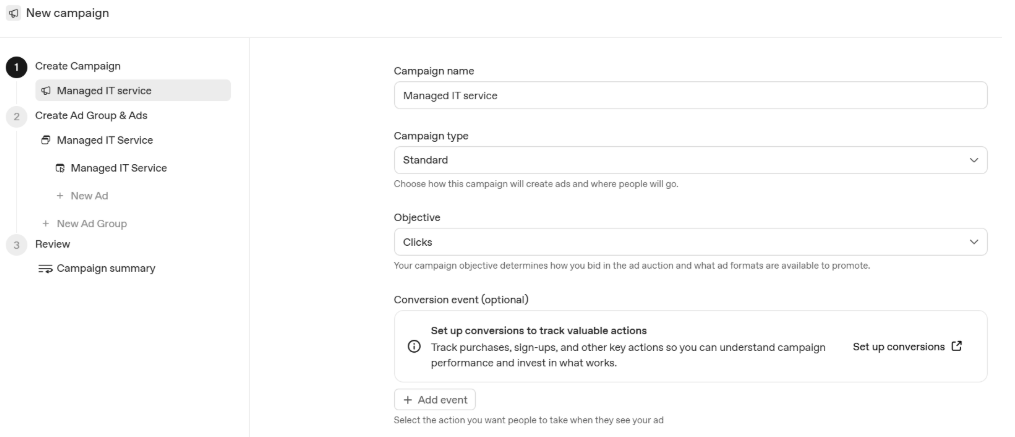
Screenshot 1: Campaign setup screen - campaign name, campaign type, budget objective and conversion event.
Recommended campaign fields
| Field | What to enter | Example |
| Campaign name | Use a clear naming convention. | Managed IT – India – Clicks |
| Campaign type | Select the available standard campaign workflow. | Standard |
| Objective | Choose based on the business goal. | Clicks |
| Conversion event | Add when optimizing for conversions. | Lead / Sign-up |
How to choose the objective
CPM: best suited to reach, scale and awareness.
CPC: best suited to traffic and website engagement.
oCPC: conversion-optimized CPC, designed to optimize toward a selected downstream conversion event.
4. Step 2 - Set Location, Platforms, Audiences and Budget
Continue through the campaign setup within the ChatGPT Ads Manager account to define where the campaign can run and who it should reach. Depending on the available account options, you can select countries or more granular supported locations, platforms, and include or exclude custom audiences.
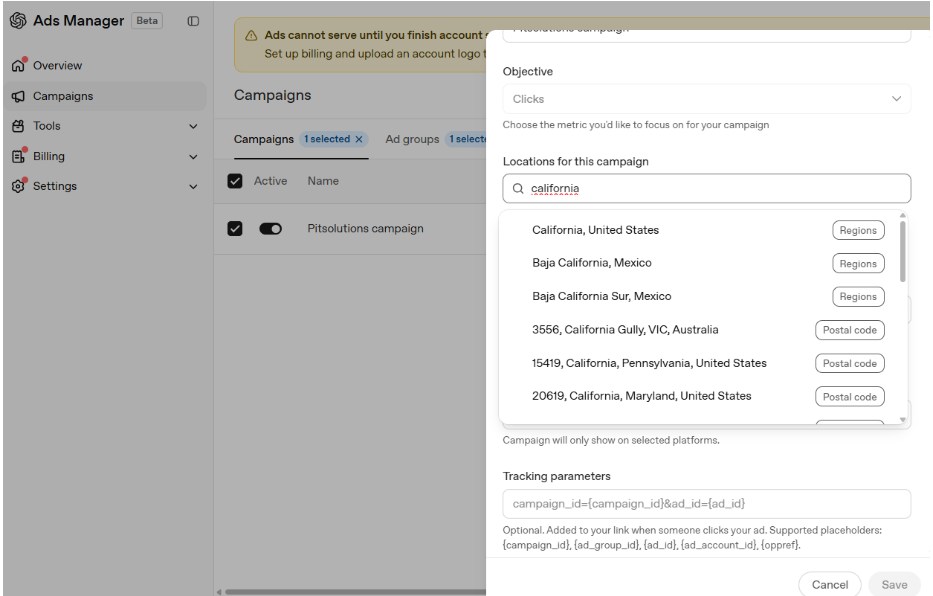
Screenshot 2: Campaign targeting location based on states
Budget guidance
OpenAI currently documents a minimum daily campaign budget of ₹750 for India and $25 for the United States. A higher test budget, such as ₹2,000/day, can provide more delivery opportunity when the business needs faster learning, subject to performance and account limits.
5. Step 3 - Create the Ad Group
Ad groups sit below the campaign. Use them to organize different themes, customer needs, products, services or intent areas. Do not put unrelated services into one ad group if the messaging and landing pages are substantially different.
Example structure for a Managed IT campaign:
-
Ad Group 1: Managed IT Services
-
Ad Group 2: 24/7 IT Support
-
Ad Group 3: Cybersecurity Services
-
Ad Group 4: Cloud Infrastructure & Support
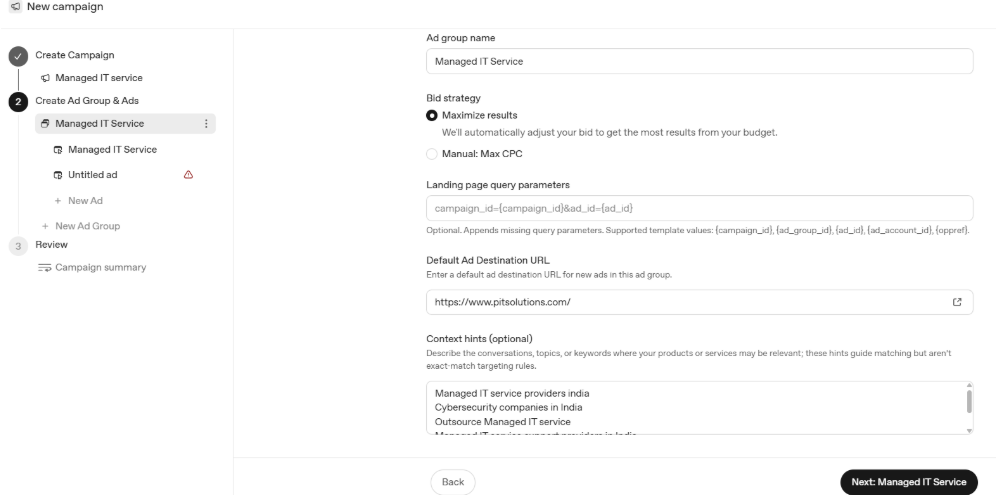
Screenshot 3: Ad preview - choose the bid strategy, default ad URL (landing page), Context Hints (Topics or keywords)
6. Context Hints - What Are They?
Context hints describe the types of conversations, topics or intent areas where an ad group may be relevant. They should reflect real customer questions and commercial themes rather than simply repeating the company name.
For a Managed IT Services ad group, useful context hints could include:
-
managed IT services
-
24/7 IT support
-
outsourced IT support
-
IT support for small business
-
managed service provider
-
business IT infrastructure management
-
cybersecurity and IT support
-
cloud and IT infrastructure support
-
IT helpdesk outsourcing
-
IT support company in India
Best practice: build context hints from the questions customers actually ask your sales team. Think in terms of needs and intent: problem + service + audience + location + outcome.
7. Step 4 - Create the Ad
An ad is the creative unit shown to users. It includes the brand, title, description/copy, landing page URL and image.
What you need to provide for the ChatGPT ads
| Asset | Requirement | Example |
| Ad name | Internal name for reporting/management. | Managed IT – Ad 01 |
| Landing page URL | Valid, live and reachable page. | www.example.com/managed-it |
| Title | Maximum 50 characters; concise is better. | 24/7 Managed IT Service |
| Description | Maximum 100 characters; communicate value clearly. | Reliable 24/7 IT & cybersecurity support |
| Image | PNG/JPG; square format is recommended. | Managed IT service creative |
8. How to Write a Strong ChatGPT Ad
A simple formula:
Title = Service + key benefit
Description = Value proposition + trust/benefit + action
Example for Managed IT Services:
Title: 24/7 Managed IT Service
Description: Reliable 24/7 IT & cybersecurity support for your business.
Additional headline ideas:
-
Reliable Managed IT Support
-
24/7 Business IT Support
-
Secure & Managed IT Services
-
Outsource Your IT Support
-
Managed IT & Cybersecurity
9. Landing Page Query Parameters
ChatGPT Ads Manager supports optional landing-page query parameters for tracking campaign, ad group, ad and account information. For example, the interface shown in the screenshot uses campaign_id and ad_id placeholders. Use these parameters when your analytics or CRM setup is designed to capture them.
10. Step 5 - Set Up Conversion Tracking
If the goal is lead generation or sales rather than simple traffic, conversion tracking is important. OpenAI's conversion-optimized campaigns use a selected downstream event such as a lead submission, sign-up or purchase.
Typical conversion setup workflow:
-
Define the primary business conversion - e.g., Lead Submitted.
-
Set up the supported conversion measurement method in Ads Manager.
-
Install/configure the required tracking on the website or through the supported integration.
-
Test the event before launching the campaign.
-
Select the conversion event when creating an oCPC campaign.
-
Monitor conversions, cost and lead quality after launch.
Important: the campaign objective and selected conversion event have restrictions after creation. If you need a fundamentally different objective or conversion event, plan the structure carefully before launching.
11. Final Campaign Structure
A simple B2B campaign can be structured as follows:
-
Campaign: Managed IT Services – India
-
Ad Group: Managed IT Services
-
Context hints: managed IT, outsourced IT, 24/7 IT support, MSP, IT infrastructure
-
Ad 1: 24/7 Managed IT Service
-
Ad 2: Reliable Managed IT Support
-
Landing page: Managed IT service landing page
-
Conversion: Lead submission
12. Pre-Launch Checklist
-
Ads Manager account created and verified
-
Business logo and brand information added
-
Billing profile and payment method completed
-
Correct country/location selected
-
Campaign objective selected
-
Budget confirmed
-
Ad group theme clearly defined
-
Context hints added
-
Landing page tested
-
Title within character limit
-
Description within character limit
-
Square PNG/JPG creative uploaded
-
Conversion event configured and tested, if applicable
-
Tracking parameters added, if required
-
Campaign, ad group and ad names follow a consistent naming convention
13. Best Practices for B2B and B2C Advertisers
- Separate intent themes: Use different ad groups for different services, customer problems, or product categories.
- Match ad and landing page: The landing page should directly answer the need communicated by the ad.
- Test multiple messages: Create variations around different benefits, pain points and value propositions.
- Use real customer language: Build context hints from sales calls, search queries, FAQs and customer questions.
- Start focused: Avoid combining too many unrelated products or audiences in one ad group.
- Measure quality, not only clicks: For lead generation, evaluate qualified leads and downstream sales outcomes.
- Scale based on evidence: Increase budget after identifying ads, ad groups and audiences that perform well.
14. Key Takeaway
The strongest ChatGPT Ads campaigns should be built around customer intent rather than simply around a list of keywords. Start with a clear business objective, organize related intent into ad groups, use useful context hints, create concise ad copy, send users to a relevant landing page and configure conversion tracking when lead or sales generation is the goal.
For Indian advertisers, the current documented minimum daily campaign budget is ₹750/day test is a practical starting point. For US campaigns, the current documented daily minimum is $25. These figures and Ads Manager features can change as the product evolves.
Looking to advertise your B2B or B2C brand on ChatGPT? Get in touch with the PITS Digital team for complete campaign setup and ongoing support.