




A year ago, most of our frontend debates were about which state library to commit to, or whether it was finally time to move everything to the App Router. Those debates haven't disappeared, but a different one keeps crowding them out.
How do we structure a codebase so an AI agent can work inside it without quietly breaking things two files away?
That question reshapes more than it looks like it should. It changes how we draw boundaries, how strict we get about conventions, and even what we mean when we call code "good."
This isn't a post about Artificial Intelligence replacing frontend engineers. It's a rundown of what we've run into while shipping actual products: React, Vue and Next.js apps with TypeScript, API integrations, state management, real test suites, deployment pipelines, with agents doing a meaningful share of the implementation. Some of it has saved us real time. Some of it has cost us hours we never planned to spend.
We are actively leveraging advancements in Artificial Intelligence and Data Science at PIT Solutions in our development efforts.
How AI Agents Are Changing Frontend Development
The first thing a team usually notices, once an agent starts touching a live codebase, is that separation of concerns stops being a stylistic preference and turns into the line between an agent that helps and one that makes a mess. Code that mixes data fetching, rendering, and business rules in one component used to be survivable. Annoying, but survivable, because a person could hold the whole thing in their head. An agent doesn't work that way. It pattern-matches against whatever sits in front of it. When everything is tangled, it either overfits to the tangle or invents a fresh tangle of its own.
Why Predictable Architecture Matters in AI Application Development
That points at something slightly uncomfortable: predictability is now one of the most valuable properties you can build into a system. Not cleverness. Not flexibility for its own sake. Predictability. AI is genuinely strong at recognizing patterns and extending them, so the more consistent your patterns are, the more reliable its output gets. We've watched the exact same prompt produce wildly different quality depending on whether the surrounding code followed a clear, repeatable shape or not.
There's a practical upside too. Boilerplate has gotten so cheap to generate that it changes the math on setting things up properly. Scaffolding a feature module, wiring a route with its loading and error states, dropping in a test file next to the component, all of that used to feel like overhead. Now it's a few minutes of work. The catch is that this only pays off if the boilerplate itself is solid. A robust, well-considered boilerplate, repeated consistently across features, has turned out to be one of the highest leverage bets a team can make right now. It's the difference between an agent that extends your patterns cleanly and one that improvises a slightly new shape every single time.
Now the other side. Leaning on AI for everything, constantly, becomes counterproductive fast. It's impressive at structure and boilerplate. Business logic is where it still slips, and not occasionally. Invented edge cases, made-up API contracts, logic that looks completely plausible and simply doesn't match what the product needs to do. This happens often enough that we stopped treating it as a fluke and started treating it as a known failure mode to design around.
Framework Selection for AI-Assisted Development
A slightly contrarian view has grown on us over time: the framework you pick matters less than the opinions it imposes. Most frameworks ship with an opinionated architecture baked in. File-based routing, a prescribed way to fetch data, conventions about where things should live and much more. The name on the box matters less than whether your team has actually read through those opinions and built boilerplate that hugs them tightly. Teams that do this get a compounding advantage measured in months. Teams that fight the framework's grain, or only half-adopt its conventions, end up with code where neither a person nor an agent can guess where anything lives.
We've also noticed agents do better with more atomic frameworks and libraries. React is the obvious case. A lot of that comes down to the boundaries you can draw around modules. A component is a unit. A hook is a unit. When the pieces are small and clearly scoped, an agent has a much easier time reasoning about blast radius: what it's allowed to touch, what it shouldn't need to, and what a change affects.
Whatever framework you land on, the real core sits in the boundaries you draw around each feature. That's what decides whether an agent can work confidently inside one slice of the app without first needing to understand the whole thing. And understanding the whole thing is exactly where agents struggle once a project grows. Context windows are finite. Codebase comprehension degrades as the project sprawls. Tight feature boundaries are partly just a defence against that limit.
One habit we've started questioning is the old reflex toward maximum reusability, abstracting everything into shared components the moment a second use case appears. Modern compilers and bundlers handle a lot of the tree-shaking and dead-code work that reusability used to justify. So, the case for "make everything reusable" is honestly debatable now. Sometimes a little duplication across two feature slices is easier for everyone, humans and agents both, to reason about than one shared abstraction straining to serve five callers with five different needs.
The conventional principles
None of this is new advice. That's sort of the point. It just carries more weight now than it used to.
Optimal reusability, not maximal reusability, is the target. The urge to abstract early needs a leash. Abstract too eagerly and you create shared surfaces that agents, and people, end up misreading because the abstraction is trying to do too much at once.
Problem decomposition stays foundational. Before a line gets written, by a person or an agent, splitting the actual problem into smaller, well-defined pieces is still the step that decides how clean everything downstream turns out.
The deductive approach holds up too. Reasoning forward from what you know to be true about the requirements, instead of grabbing something that merely looks like a thing you've seen before. This is precisely where agents can lead you astray, because pattern-matching is what they're built to do, and it can look an awful lot like sound reasoning while being nothing of the sort.
And code style and conventions, which used to feel like a tedious linting argument, now have teeth. Consistent conventions are the language you use to tell an agent what you mean. A messy, inconsistently styled codebase doesn't just read badly in review. It actively drags down the quality of whatever the agent produces inside it.
Feature-Sliced Architecture and Clear Boundaries
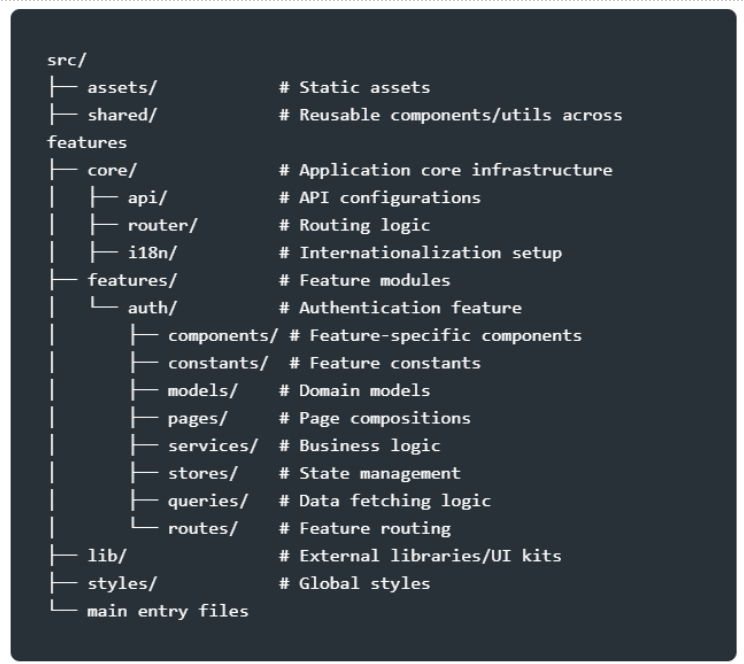
For us this comes down to one idea: draw clear boundaries around each feature and lean into feature-sliced patterns. In practice it's been one of the more dependable ways to keep an agent's changes contained. When a feature lives in its own slice, with its own components, hooks, types, and tests, and only a thin, well-defined surface for talking to the rest of the app, an agent working in there has a smaller, saner scope to hold in context. It makes reviewing the generated code easier too, since the diff naturally stays where it belongs.
The tricky part is that not every framework hands you this for free. Some practically give you the feature-sliced shape out of the box. Others make you impose it by hand. Angular is a decent example of one that nudges you toward this kind of boundary-drawing almost by default, largely thanks to its reliance on dependency injection. The DI container forces you to be explicit about what depends on what. Other ecosystems, React included, leave the door open to do this well or do it badly, and the result rides entirely on how disciplined the team chooses to be.
Design Systems in AI-Driven Frontend Projects
Design systems sit at a different layer of the problem. They're mostly about UX and UI consistency, but they end up brushing against architecture, performance, and now agent behaviour, all at once. Building one from scratch or adopting an existing one is rarely a clean call, and performance is usually the thing that complicates it.
The simple rule we keep returning to is a question. Do you need granular control over rendering and styling, or not? That one question decides the path more than anything else, because it's really a performance question wearing a different hat. Get it wrong and it can make or break how the platform feels in production, especially on the content-heavy or interaction-heavy pages where every extra re-render and unnecessary style recalculation piles up.
A well-built design system, paired with a Figma library that mirrors it component for component, gives a project a real kind of independence. Designers and engineers stop blocking each other. New features come together faster because the blocks already exist and already match. That independence isn't free, though. It costs real engineering time to build and ongoing time to keep the code and the design files in sync as the product moves. Teams that skip the maintenance part tend to watch their system drift from its Figma counterpart within a couple of quarters, which creates a fresh kind of confusion all its own.
There's also a heavy reliance across the industry right now on shadcn-inspired designs and component patterns. It's everywhere. Depending on who you ask, that's either healthy convergence on sensible defaults or a sign that half the web is starting to look identical. Either way, there's nothing wrong with using it. For rapid development, internal tools, MVPs, and teams without the bandwidth to build something bespoke, it's a sound choice. The trade-off is about differentiation, not quality. Just know which one you're optimizing for before you adopt it wholesale.
MCP Integrations and AI Development Guardrails
This is where the guardrails conversation gets practical for us in AI Application development, and the first rule is easy to state and easy to break: don't overuse skills. It's tempting to keep stacking specialized instructions and capabilities onto an agent. But every extra skill is one more thing competing for context, and one more place where behaviour can drift or get harder to predict.
What's worked better is pairing a focused set of skills with MCP integrations. Figma MCP and Context7 MCP have both been genuinely useful here. Figma MCP lets an agent pull real design context instead of guessing spacing and structure off a screenshot. Context7 MCP helps keep library and API knowledge current rather than relying on whatever happened to land in the model's training data. Combined with a tight set of skills, this has noticeably lifted the consistency of what comes back.
The catch is real. Maintaining all of it against an existing design system takes work. An MCP integration that pulls Figma components faithfully is only as good as the underlying system being current and well-structured. We've also had to put real effort into a sensible wrapping protocol, a consistent way of presenting these tools and skills so the agent doesn't end up juggling conflicting instructions about the design system, the component library, and the project's own conventions all at the same time. That part isn't fully solved on our end. We're still iterating on it.
Worth adding it isn't only custom skills that help. The skills and extensions shipped by the major AI tools and frameworks are often worth adopting directly instead of rebuilding. They tend to be tested across a far wider range of codebases than anything one team can manage on its own.
Lessons Learned from Real AI Development Projects
There's no tidy bow to put on this, and we think that's fair. AI agents and Advanced Machine Learning have changed how we approach boundaries, boilerplate, and conventions on the frontend, and the gains are real when the architecture underneath is disciplined enough to carry them. The gaps are real too. Business logic that hallucinates, context limits on large codebases, the constant upkeep of keeping design systems and MCP integrations aligned, the extra care security now demands. The engineering fundamentals haven't gone anywhere. If anything, they matter more, because they're the thing standing between an agent that genuinely speeds your team up and one that quietly racks up debt, you'll be paying off two quarters from now.
Let's Build Better Frontends Together
Looking to adopt AI-assisted development or modernize your frontend architecture? Our team can help you design scalable, maintainable, and high-performance applications tailored to your business needs.
Contact PIT Solutions today to start the conversation.