




As part of the EU requirements introduced by Directive (EU) 2023/2673, traders concluding distance contracts with consumers through an online interface are required to provide a clear and easily accessible online withdrawal function for contracts where a right of withdrawal applies. This requirement builds on the consumer's right of withdrawal established under the Consumer Rights Directive (Directive 2011/83/EU), enabling consumers to exercise their withdrawal rights through a simple and transparent online process. For Magento store owners selling to EU consumers, implementing a compliant online withdrawal function is therefore an important legal requirement.
When customers have to contact support team through email communication / through a ticketing system, search through lengthy policy pages, or rely on a generic contact form to submit a withdrawal request, the experience quickly becomes frustrating. Today's shoppers expect a straightforward, transparent, and compliant withdrawal process that is readily available on your webshop.
-
Guest buyers cannot find a path forward.
-
Logged-in customers bounce between order pages and inbox threads.
-
Your support team ends up answering the same questions manually—without a proper audit trail.
This is exactly the problem the EU Withdrawal Button for Magento 2 extension by PIT Solutions is designed to solve.
What Is the EU Withdrawal Button for Magento 2?
Magento 2 does not ship with a dedicated EU withdrawal or cancellation request workflow. Out of the box, you can cancel orders in the admin, send emails, and publish return policies — but there is no structured storefront journey where a shopper can locate their order, confirm eligibility, submit a withdrawal request, and receive a documented acknowledgement.
In real-world EU stores, that gap shows up quickly.
Maybe you sell to consumers across multiple countries and need a 14-day submission window that starts from order date, shipment, or delivery. Maybe you run guest checkout and cannot force every buyer to create an account just to exercise their rights. Or perhaps your team simply needs a central queue where sales and support can fulfill or decline requests — instead of scattered emails and spreadsheets.
Instead of hacking together contact forms, custom CMS pages, or risky manual processes, this EU withdrawal extension for Magento 2 gives you a straightforward, auditable withdrawal flow — without rebuilding your catalog or checkout.
Why EU Withdrawal Compliance Matters for Magento Stores
Regulators and consumer associations increasingly penalize merchants who hide cancellation options inside legal fine print. For EU withdrawal compliance for Magento stores, true compliance means:
-
🔍 Discoverability: Shoppers can find how to cancel without contacting support first.
-
👥 Universal Access: Guest and logged-in customers can both submit requests.
-
🛡️ Automated Gatekeeping: Eligibility is instantly checked against order status, time windows, and product rules.
-
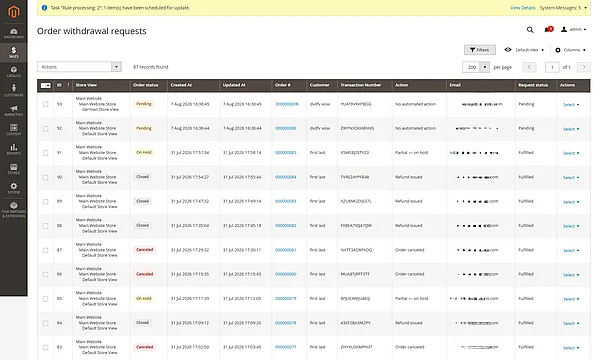
📋 Centralized Operations: Staff have a single admin queue to inspect, fulfill, or decline requests.
Without this structure, you risk compliance complaints, expensive chargebacks, support ticket overloads, and severe reputational damage during peak shopping seasons.
Key Features of the EU Withdrawal Button for Magento 2
🛍 Storefront Experience |
⚙ Admin & Operations |
📜 Policy & Notifications |
|
✔ Guided guest order lookup |
✔ Centralized Request Grid |
✔ Configurable 14-day withdrawal period |
|
✔ Logged-in customer order actions |
✔ Bulk actions (Fulfill & Decline) |
✔ Automated email notifications |
|
✔ Optional footer entry links |
✔ Flexible workflow modes |
✔ Store-scoped configuration |
|
✔ Secure tokenized email links |
✔ Diagnostics & trace logging |
✔ Customizable email templates |
How the EU Withdrawal Button Extension Works
The PIT Solutions EU Withdrawal Button for Magento 2 offers three configurable workflows that determine what happens after a customer confirms a withdrawal request. This allows merchants to choose the level of automation that best fits their business processes.
Manual Workflow (Store Request Only)
In this mode, the extension simply records the withdrawal request and sends a confirmation email to the customer. The request is added to the Order Withdrawal Requests Grid, where your team can review it and manually fulfill or decline the request.
Best suited for: Merchants who prefer complete manual control over every withdrawal request.
Semi-Automatic Workflow (Store and Alert Admin)
This mode includes everything in the Manual Workflow, with the addition of an internal notification email sent to the configured administrators. The email contains quick review links, allowing your support team to access and process the request immediately from the Magento Admin.
Best suited for: Stores that want faster response times while keeping the final approval in the hands of their support team.
Automatic Workflow (Store and Auto-Process)
In Automatic mode, the extension stores the request and immediately attempts to process it based on the order status. Open orders are cancelled automatically where possible, while shipped orders can trigger an offline refund workflow when supported. Customers continue to receive the appropriate email notifications throughout the process.
Best suited for: High-volume stores that want to automate eligible withdrawal requests and minimize manual intervention.
Customer Journey
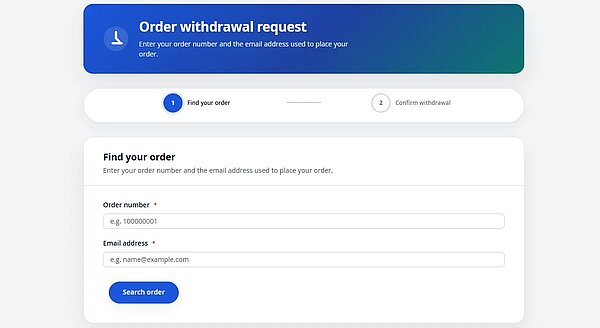
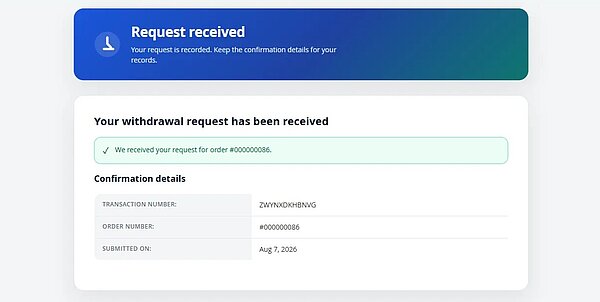
Customers can submit a withdrawal request through the footer link, their My Account page, or a secure withdrawal link included in the order confirmation email. The extension guides them through a simple step-by-step process and sends an acknowledgement email once the request has been submitted.
Behind the Scenes
The extension automatically validates each request against your configured withdrawal period and order eligibility rules. It also performs scheduled cleanup of expired email tokens, helping keep your Magento store secure and your database optimized.
How to Configure the EU Withdrawal Button in Magento 2
All configurations are handled directly from the Magento Admin Panel, without custom code or theme overrides.
Step 1: Enable the extension
- Navigate to Stores → Configuration → Pits Extensions → EU Withdrawal Button → General
- Set Module active to Yes
- Run standard deployment commands
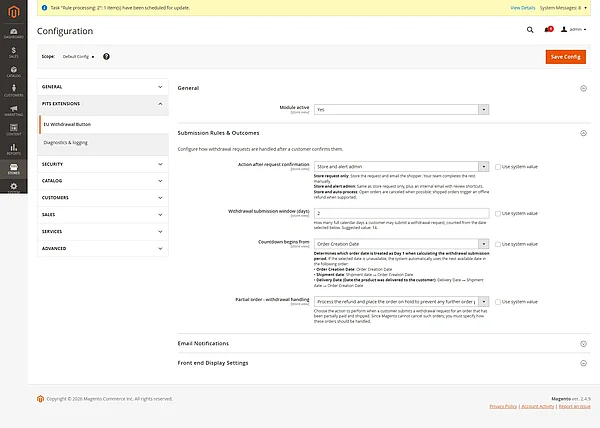
Step 2: Configure submission rules
Under Submission Rules & Outcomes, define how your shop handles confirmed requests:
-
Action after request confirmation — Store request only, Store and alert admin, or Store and auto-process
-
Withdrawal submission window (days) — typically 14
-
Countdown begins from— order creation date, shipment date, or delivery date
-
Partial order - withdrawal handling: Used only when a withdrawal is fulfilled (manual or auto-process) and the order has shipped items that are not invoiced yet.
Step 3: Set Up Automated Email Notifications
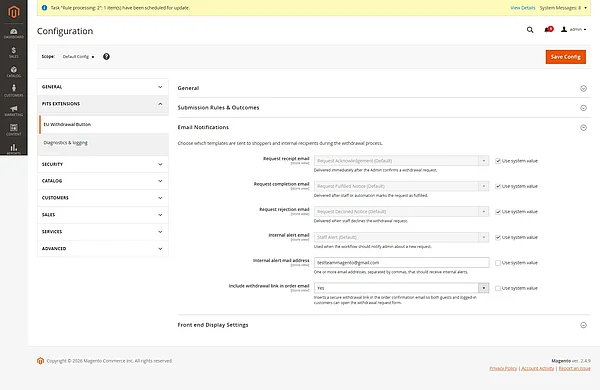
Under Email Notifications, assign templates and recipients:
-
Request receipt email (sent after confirmation)
-
Request completion and rejection emails
-
Internal alert email and mail address
-
Include withdrawal link in order email — adds a secure withdrawal link to order confirmations
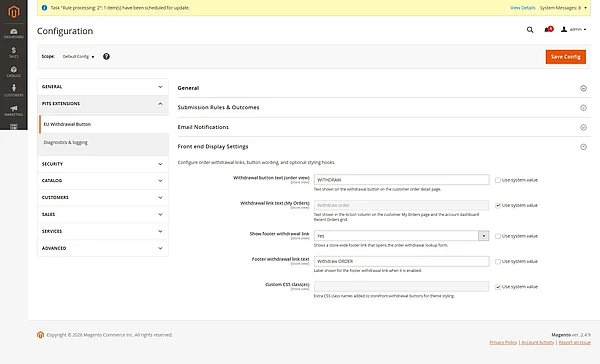
Step 4: Adjust storefront display
Under Front end Display Settings, configure:
-
Withdrawal button text (MyAccount)
-
Withdrawal link text (My Orders)
-
Show footer withdrawal link and text
-
Footer withdrawal link text
-
Custom CSS class(es) for button styling
Step 5: Save and test on the frontend
Once saved, run a test journey through the guest locate URL to ensure your eligibility matrix, blocklists, and confirmation sequences are performing intentionally.
EU Withdrawal Button Use Cases for Magento Stores
This Magento 2 EU withdrawal button fits naturally into many real-world Magento setups.
-
B2C retailers selling across the EU can offer a visible cancellation path without routing every request through support tickets.
-
Stores with heavy guest checkouts can still honour withdrawal rights through order lookup and email withdrawal links.
-
High-volume shops can alert staff or auto-process eligible orders instead of manually triaging every email.
-
Agencies and integrators can deliver a proven compliance feature to clients without building a custom module from scratch.
Magento 2 Built-In Functionality vs EU Withdrawal Button
Magento Open Source and Adobe Commerce both support order management, emails, and customer accounts — but neither provides a ready-made Magento 2 withdrawal workflow on the storefront.
You can cancel orders manually in admin, publish static CMS pages, or wire up third-party return portals — but those approaches rarely combine guest access, eligibility rules, tokenized email links, and a dedicated request queue in one cohesive package.
The EU Withdrawal Button extension delivers that missing functionality in a focused, maintainable module — built specifically for Magento 2 merchants who need to act now, not after the next compliance review.
Benefits of the EU Withdrawal Button for Magento Store Owners
Because the extension uses familiar Magento patterns — configuration scopes, email templates, admin grids, and customer groups are not required for the core flow — setup stays approachable for merchants and agencies already comfortable with Magento admin.
You gain:
-
Less support noise — fewer “how do I cancel?” emails
-
Clear audit trail — every request has a status and reference
-
Faster resolution — fulfill or decline from one screen
-
Configurable automation — match how your team works
-
Store-scoped policies — different rules per website or store view where needed
Simple idea. Big impact.
Frequently Asked Questions About EU Withdrawal in Magento 2
-
Is an EU Withdrawal Button required for Magento 2 stores?
Yes. EU rules require a clear online withdrawal function for eligible distance contracts. Magento 2 does not provide this out of the box. -
Does Magento 2 have a built-in EU withdrawal workflow?
No. Magento can cancel orders and send emails, but it has no dedicated storefront withdrawal request flow with eligibility checks and an admin queue. -
Can guest customers submit a Magento 2 withdrawal request?
Yes. Guests can use order lookup and secure email links without creating an account. -
How does eligibility work for Magento 2 withdrawal requests?
The extension checks your configured window (usually 14 days), start date rules, and order eligibility before allowing a request. -
What happens after a customer submits a withdrawal request?
You can store it for manual review, alert admins, or auto-process eligible orders—with customer email confirmations either way.
Final Thoughts
The EU Withdrawal Button for Magento 2 from PIT Solutions is no longer a future compliance milestone—it is a present-day expectation. If your Magento 2 store still relies on manual emails and static CMS text pages, you are leaving compliance, customer trust, and operational efficiency on the table.
Ready to Make Your Webshop EU-Withdrawal-Ready?
If you would like to know more about the PIT Solutions EU Withdrawal Button for Magento 2 or to purchase, you can check it here:
👉 Get the EU Withdrawal Button Extension for Magento 2
Looking for advanced functionality or tailored compliance workflows? Explore our Magento 2 development services to build features specific to your business infrastructure.