



The modern digital landscape calls for smooth connections between strong content management systems and simple, design-friendly website builders. Pimcore is an award-winning Data and Experience Management platform trusted by more than 118000 companies across the world, and it becomes especially effective when paired with Webflow for its easy design approach. This combination helps businesses build dynamic, data-driven websites that make use of Pimcore's product information management, master data management, and digital asset management, while still retaining Webflow's design flexibility. In this guide, we look at how Pimcore can be connected with Webflow, the benefits of doing so, and practical examples of its use.
Understanding Pimcore: The Foundation
Pimcore is more than a standard CMS. It is a unified platform that brings together several strong capabilities:
Product Information Management (PIM): Centralize product data, specifications, and attributes across all channels
Master Data Management (MDM): Maintain consistent, high-quality data across the organization
Digital Asset Management (DAM): Manage and organize images, videos, and documents Customer Data Platform (CDP): Build unified customer profiles for personalized experiences Digital Experience Platform (DXP): Create content suited for multiple channels and contexts E-Commerce Framework: Support advanced B2B and B2C commerce needs
This wide range of features makes Pimcore suitable for enterprises handling large product catalogs, multiple sales channels, and detailed data workflows.

Why Integrate Pimcore with Webflow?
Webflow excels at visual design and rapid website development but has limitations when managing large-scale product data and complex backend operations. Integrating Pimcore addresses these gaps:
- Dynamic Content at Scale: Pull live product data directly from Pimcore into Webflow, eliminating manual updates and ensuring consistency across channels
- Real-Time Data Synchronization: Keep product information, inventory levels, and pricing current without requiring developers to rebuild pages
- Advanced Data Management: Leverage Pimcore's PIM and MDM capabilities while maintaining Webflow's design flexibility
- E-Commerce Integration: Connect Pimcore's commerce framework with Webflow to support richer product experiences
- Scalability Without Complexity: Manage thousands of products and master data without losing the visual simplicity Webflow provides
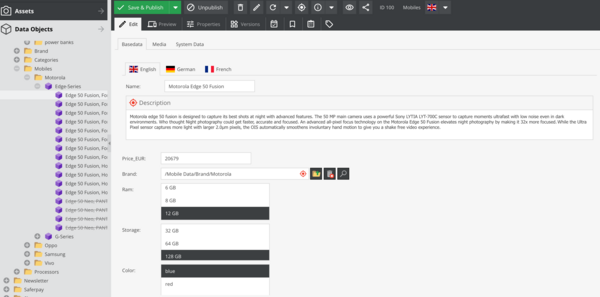
How Pimcore-Webflow Integration Works
The integration functions through API connections that allow bidirectional data flow. Here is the typical architecture:
- API Layer: Pimcore exposes REST or GraphQL APIs that Webflow can consume, allowing Webflow to request product data, asset URLs, and other information on demand
- Data Mapping: Custom configuration maps Pimcore's data structure to Webflow's dynamic content fields, ensuring product attributes, images, and metadata appear correctly
- Webhooks and Automation: When data changes in Pimcore (product details, pricing, inventory), webhooks trigger updates in Webflow, keeping the website current in real time
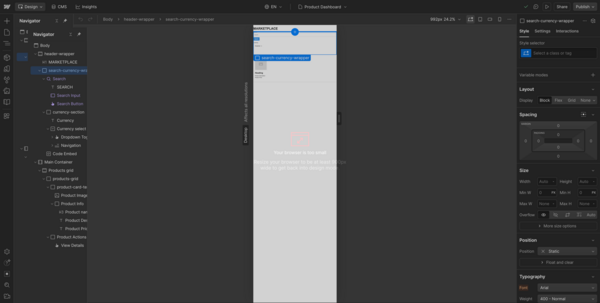
- Dynamic Content Rendering: Webflow's collection items and CMS features display Pimcore data, creating dynamic product pages, dashboards, and catalogs without hardcoding information.
Technical Requirements for Pimcore Integration
Prerequisites
- Pimcore Setup: A running Pimcore instance with API access enabled and properly configured authentication (typically API tokens or OAuth)
- Webflow Account: Professional plan or higher (required for API access and custom code)
- API Knowledge: Understanding of REST/GraphQL APIs, JSON data formats, and HTTP methods
Best Practices for Pimcore-Webflow Integration
- Data Architecture Planning: Before implementing, map your full data structure. Understand which Pimcore data must sync to Webflow, how often it updates, and what transformations are needed
- Version Control: Use version control systems for your Pimcore integration code to support rollback and team collaboration
- Cache API responses where suitable to reduce load on Pimcore and improve Webflow page performance. Avoid excessive API calls
- Error Handling: Implement strong error handling and logging. Set up monitoring to alert you when synchronization fails
- Security Considerations: -> Store API tokens securely (use environment variables instead of hardcoded values) -> Implement rate limiting on API endpoints -> Use HTTPS for all data transmission -> Validate and sanitize all incoming data
- Testing Protocols: Test thoroughly in staging environments before deploying to production. Verify edge cases such as special characters, empty fields, and large datasets
- Documentation: Maintain clear documentation of your integration, including API endpoints used, data transformations applied, and troubleshooting steps
Common Use Cases
- E-Commerce Product Catalogs: Display thousands of products from Pimcore in a beautiful Webflow storefront with real-time inventory tracking and dynamic pricing.
- Multi-Channel Content Distribution: Maintain a single source of truth in Pimcore while delivering optimized experiences across web, mobile, and social channels through Webflow.
- B2B Portals: Create personalized customer portals where B2B clients access customized product information, pricing, and orders pulled from Pimcore data.
- Dynamic Marketing Sites: Build campaigns that pull testimonials, case studies, and success metrics from Pimcore, automatically updating content as data changes.
- Analytics and Reporting: Transform Webflow into a reporting interface displaying KPIs, sales metrics, and business intelligence dashboards sourced from Pimcore and connected systems.
- Inventory Management Dashboards: Give stakeholders real-time visibility into stock levels, warehouse inventory, and supply chain data through interactive Webflow dashboards.
Conclusion
Integrating Pimcore into Webflow creates a strong combination that links sophisticated data management with intuitive web design. Pimcore's capabilities in product information management, master data management, and digital asset management work together with Webflow's visual design strengths to help businesses create dynamic, data-driven digital experiences at scale. Whether you are
building dynamic product catalogs, interactive dashboards, real-time data displays, or advanced e-commerce platforms, the Pimcore-Webflow integration offers the flexibility, scalability, and performance modern businesses need. The key to success lies in careful planning, solid API design, thorough testing, and a focus on security and data consistency. Looking to integrate Pimcore with Webflow seamlessly? Partner with PIT Solutions for scalable, data-driven digital experiences.