


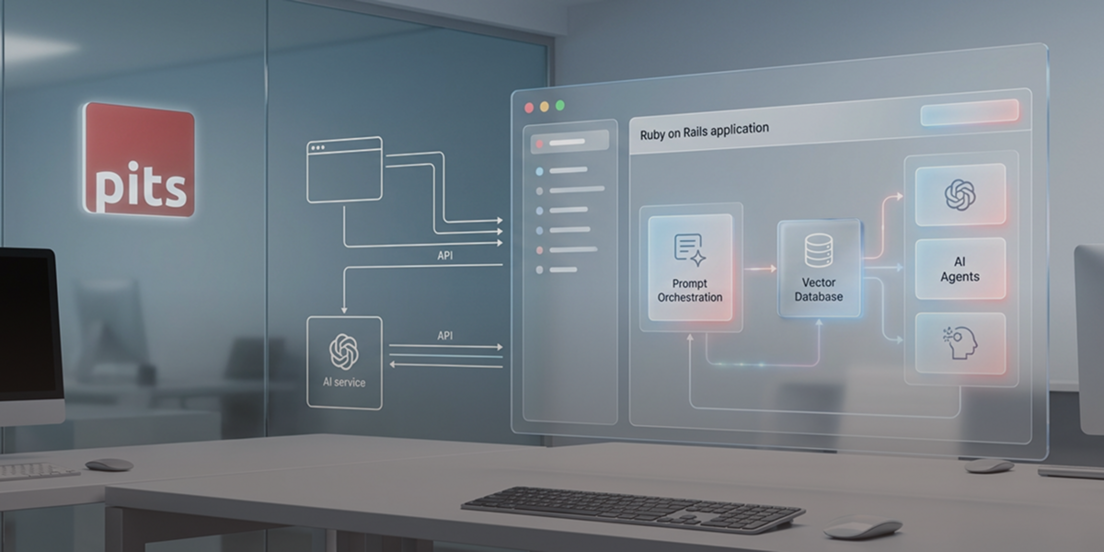
Ruby on Rails is an open-source web framework built with the Ruby programming language. It provides the structure and tools developers need to build database-backed web applications, handling common tasks like routing, database queries, and rendering pages through a set of conventions and patterns.
For years, AI integration in Ruby on Rails meant making an API call, hoping the response made sense, and moving on. Prompts lived as strings scattered across service objects. Testing meant crossing your fingers. And when something broke in production, good luck debugging it.
That’s changing fast.
AI isn’t something teams “try out” anymore. It’s sitting right in the middle of real features—support replies, recommendation logic, internal tools people rely on every day. And once you start shipping more of this in a Rails app, the honeymoon phase ends pretty fast. The real question becomes less about “can we build this” and more about “how do we stop it from turning into a mess six months later?”
The answer isn’t a single library or framework. It’s an emerging set of patterns that make AI behave more like regular application code and less like magic that happens somewhere else. At PIT Solutions, we’ve seen these patterns mature across real production systems—and what follows is a distillation of what actually works.
When AI Stops Being Optional
In a lot of Rails apps today, AI isn’t some optional extra anymore. It’s wired straight into real workflows—things users see, business rules that matter, decisions that affect outcomes. It sits in the same layer as auth, billing, and permissions, whether we planned it that way or not.
Once AI starts affecting how the product behaves, you don’t get to treat it as “special” anymore. It has to be testable. You need visibility into what it’s doing in production. And when something goes wrong, you should be able to trace why it made a particular decision.
Because at some point—usually months later—someone will be staring at that code trying to fix an issue. And there’s a good chance that person won’t be the one who originally built it.
Starting Simple: Direct AI API Integration in Rails
Most Rails teams start with the obvious approach: hit an LLM API from a service object. You write a class that builds a prompt, calls OpenAI or Anthropic, handles the response, and returns something useful. Maybe you wrap it in a background job to handle latency. You add some retry logic. It works fine for the first few features.
Then you add more AI functionality, and things get messy. Prompt logic starts bleeding into business rules. Retry logic lives in three different places. Multi-step interactions become hard to follow. Testing becomes awkward because you’re not quite sure what you’re testing—the prompt? The parsing? The business logic around it?
At some point, you realize you’re not just calling an external API anymore. You’re building application logic that happens to use AI.
Managing AI Workflows as Application Logic
Real AI features rarely involve a single request and response.
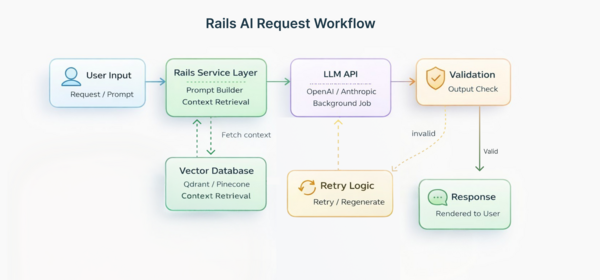
What you end up with is something that unfolds in steps. First there’s the user input. Then you’re pulling in whatever context seems relevant. After that comes a decision, some generated output, a quick check to see if it’s usable, and occasionally another pass when it clearly isn’t.
That’s not one neat API call anymore. It’s an AI workflow architecture. And workflows need some structure if they’re going to hold up.
Rails developers already know how to handle this kind of complexity. We use conventions. We separate concerns. We make things explicit instead of implicit. The question is how to apply those same instincts to AI-driven behavior.
As teams build more AI features, certain Rails-native AI patterns keep showing up. Rather than sprinkling AI-related code across controllers and background jobs, more teams are pulling that logic into its own place. At that point, those AI actions stop feeling like loose bits of logic and start behaving more like regular objects in the app. They have a specific job, they play nicely with the rest of the Rails stack, and they don’t ask you to adopt some completely new mental model just to use them.
Some teams are building their own abstractions. Others are using libraries that apply Rails conventions to AI behavior—projects like LangChain.rb, ActiveAgent, and similar tools that make AI feel less like a foreign dependency and more like another part of your application.
Prompt Management in Rails
One thing becomes clear pretty quickly: prompts aren’t just strings.
They’re carrying business logic. The wording directly affects what your app does, and over time they change as you figure out what actually works in production and what doesn’t. When that kind of logic lives as inline text scattered around the codebase, it turns into a mess fast. It’s hard to reason about, harder to update, and almost impossible to review properly.
A cleaner approach to prompt management in Rails is to treat prompts the same way Rails already handles things like views, mailers, or config files. Give them a proper home. Put them somewhere obvious. When something gets updated, you want to notice it right away—it should show up alongside the rest of your changes, not buried inside a random string that nobody remembers touching.
When the app starts behaving differently, you’re not starting from zero. There’s a known place to check, instead of relying on half-remembered edits and guesswork. You can look at what changed and trace how the behavior shifted. It makes it possible to reuse common patterns. And it makes reviewing prompt changes feel like reviewing any other code change instead of hunting through service objects.
Vector Database Integration in Rails
Many AI features need access to your application’s data—customer history, documentation, previous conversations, product catalogs, whatever makes sense for your domain.
This has pushed Rails teams toward semantic search and vector database integration in Rails. Background jobs process and embed content. Retrieval steps supply relevant context to AI actions. Vector databases like Qdrant, Pinecone, or Weaviate run as part of your infrastructure, not as separate systems you interact with over an API.
The patterns are still settling, but the pieces are already there. What’s different now is how they’re showing up in Rails apps—less like something tacked on after the fact, and more like something that actually belongs.
Best Practices for AI Integration in Ruby on Rails
Working on AI-powered Rails applications across different industries and team sizes, PIT Solutions has found that the teams with the least pain six months in tend to follow a consistent set of habits:
- Treat AI as a service layer, not a black box. Give it a defined place in your architecture with clear edges, the same as billing or auth.
- Version and review prompts like code. If it carries business logic, it belongs in a diff.
- Use Rails’ job infrastructure for AI workflows. ActiveJob handles retry logic, failure states, and observability without reinventing anything.
- Validate output before acting on it. Don’t assume correctness—build in assertion steps, especially for anything user-facing.
- Instrument from day one. Logging token counts, latency, and failure rates early costs little and pays back fast in production.
Operational Challenges in Production AI Systems
AI introduces challenges that don’t exist with traditional application logic. Response times vary unpredictably. Costs scale with usage in ways that aren’t always obvious. Failures can be partial—you get a response, but it’s not quite right. Output needs validation because you can’t assume it’ll always be correct. When something breaks, the worst place to be is guessing. You need to be able to see what the system did and why it ended up there.
If you treat AI like a black box, you end up with fragile systems. If you treat it like infrastructure you’re responsible for, the results tend to be a lot more predictable.
Rails already gives you solid tools for background processing, logging, and managing lifecycle concerns. The trick is designing production AI agents with the same discipline you’d apply to any other subsystem that handles variable latency and potential failures.
Shifting How We Think About AI in Rails
The biggest change isn’t technical. It’s conceptual.
AI integration in Ruby on Rails doesn’t have to live outside your application’s architecture. It can be another service layer. Another domain boundary. Another source of side effects that you manage with the same conventions and patterns you use for everything else.
When you frame it that way, AI stops feeling like an experimental feature and starts feeling like a natural extension of a well-structured Rails application.
Conclusion
Rails isn’t trying to chase every new trend, and that’s a big part of why it works so well for Ruby on Rails AI development. While other frameworks keep reshaping themselves around the latest architectural idea, Rails has stayed focused on one thing: helping you ship features without getting in your way.
That kind of consistency matters when you’re building AI into a real product. You want a foundation that stays put while you’re still figuring out what AI should do for your users, not one that keeps changing underneath you.
The framework keeps getting better. Hotwire lets one developer build full-featured applications without juggling multiple frontend frameworks. Security improvements come built-in, which matters when you’re handling AI-generated content and API keys. And background job processing—something Rails has always done well—turns out to be perfect for AI workflows that need retry logic and observability.
Libraries like LangChain.rb and ActiveAgent are bringing Rails conventions to AI development. Vector database integrations are getting smoother. You can integrate AI APIs directly, connect to Python microservices when needed, or build entire AI-powered features using pure Ruby.
The real advantage isn’t about what’s trendy. It’s about what actually works when you’re building production systems. Rails gives you a stable foundation, mature tooling, and patterns tested by thousands of teams over two decades. When you’re adding AI to your application—something inherently unpredictable— that stability makes AI integration in Ruby on Rails genuinely sustainable long-term.
Ready to Build Production-Ready AI into Your Rails Application?
PIT Solutions helps Rails teams design and ship AI features that are scalable, maintainable, and built to last—not just to demo. Whether you’re starting fresh or bringing structure to something already in production, we’re here to help.
Talk to our team about your project.