


In the fast-paced world of software development, Continuous Integration and Continuous Delivery (CI/CD) have become essential for maintaining high-quality code and ensuring rapid deployment. Test Automation plays a crucial role in this pipeline. Embedding automated tests within a CI/CD pipeline allows for seamless automation, faster feedback loops, and greater confidence in code releases.
Challenges of Manual Testing in Agile
Manually testing applications in multiple environments and browsers can be time-consuming and error-prone. When teams rely on manual software testing, it becomes difficult to ensure quality with every new release, especially when using agile methodologies that require frequent updates. Additionally, without integration into a CI/CD pipeline, test results are not immediate, which delays the feedback loop and slows down the overall software development process.
Integrating Efficient Test Automation in CI/CD Pipelines
By integrating test automation with a CI/CD pipeline, teams can automate browser-based tests and trigger them on every code change. This ensures that tests are continuously run across different browsers and environments, providing real-time feedback on the quality of the application. Through platforms like Jenkins, Azure DevOps, GitLab CI, or CircleCI, and with tools like BrowserStack for cross-browser testing, Selenium tests can be part of the build process. The results can be visualized through reporting tools like ExtentReports, providing clear insights into test performance and failures.
This integration significantly reduces manual effort, speeds up the testing process, and ensures more reliable, faster releases.
Best Practices for Automation Testing
Below mentioned are the best practices for integrating automation testing with CI/CD pipelines.
-
Set Up a Reliable CI/CD Toolchain
To begin, you’ll need a CI/CD tool to automate your build, test, and deployment processes. Common tools include Jenkins, GitLab CI, Azure DevOps, and CircleCI. Let’s take Jenkins as an example.
Example: Jenkins Integration
Imagine you’re working on a Java project using Selenium WebDriver and TestNG. You can set up a Jenkins job to pull code from your Git repository, compile the project, and execute tests automatically.
- Step 1: Install the Git and Maven plugins in Jenkins.
- Step 2: Create a Jenkins pipeline that triggers the test automation suite whenever new code is pushed to the repository.
Below is a sample Jenkins pipeline script to run tests for a Java project:
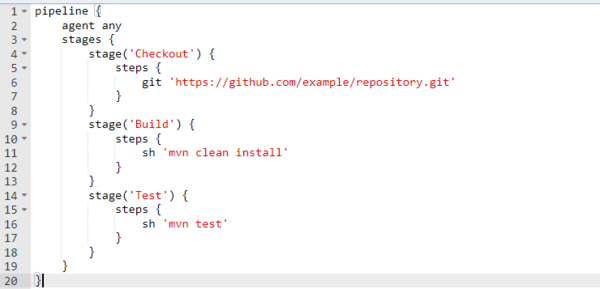
This script will automatically trigger tests every time there’s a code push. You can follow a similar approach with Azure DevOps or GitLab CI for C# projects using NUnit or MSTest.
-
Automate Test Execution in the Pipeline
Automating the test execution is crucial to catching bugs early. Once your CI/CD pipeline is set up, it should trigger test execution after every code change. By creating separate stages (build, test, deploy), you ensure each step is isolated.
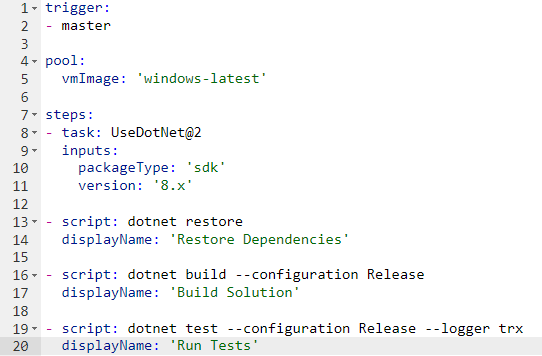
Example: Azure DevOps Pipeline for C#
For a C# project with NUnit, an Azure DevOps pipeline can be configured as follows:
-
Use Docker for Test Environment Consistency
Running tests in different environments can lead to inconsistencies. Docker allows you to create reproducible test environments. With Selenium, you can run your tests inside a Docker container that has pre-installed browsers and drivers.
Example: Dockerized Selenium Grid
In this example, we use Docker Compose to set up a Selenium Grid that runs tests across multiple browsers.
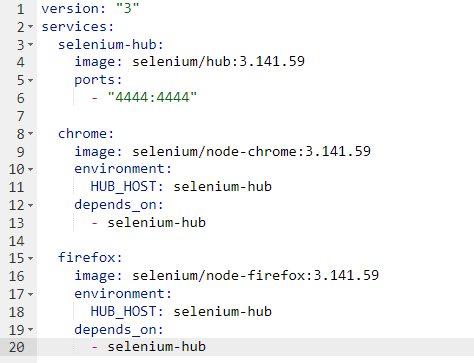
This setup allows you to run parallel tests in Chrome and Firefox. You can integrate this into your pipeline by ensuring that the Selenium Grid starts before the test automation phase begins.
-
Leverage Cloud Testing Platforms
Instead of maintaining your own Selenium Grid, you can integrate cloud automation testing platforms like BrowserStack or Sauce Labs. These platforms provide access to multiple browsers and devices, making cross-browser testing more efficient.
Example: BrowserStack Integration
If you use BrowserStack, you can run your tests on real devices in the cloud. Here’s how to integrate it into your tests:
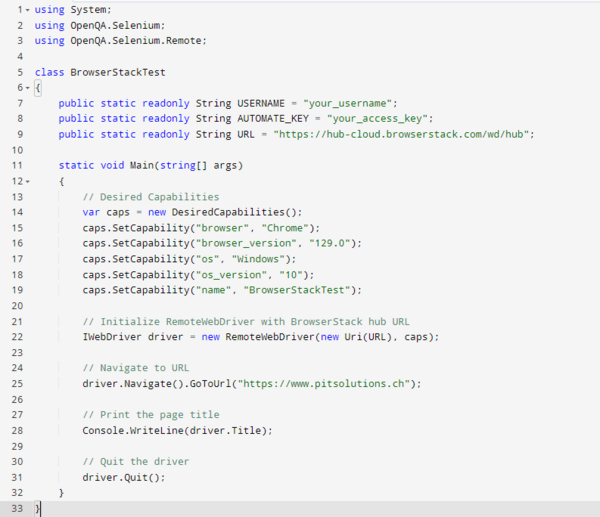
With BrowserStack, you can ensure your tests run on real browsers across different devices, improving test reliability.
-
Ensure Test Result Visibility
Having clear and accessible test results is crucial in a CI/CD pipeline. Tools like ExtentReports in C# help generate detailed reports that provide insights into test execution, failures, and more.
Example: NUnit + ExtentReports
In C# Selenium projects, you can use ExtentReports to create visually rich reports. Here’s how to integrate ExtentReports into your NUnit tests:
- Install ExtentReports via NuGet: Add the following packages via NuGet:
- ExtentReports
-
ExtentReports.Selenium
- Configure ExtentReports in C#:
- Install ExtentReports via NuGet: Add the following packages via NuGet:
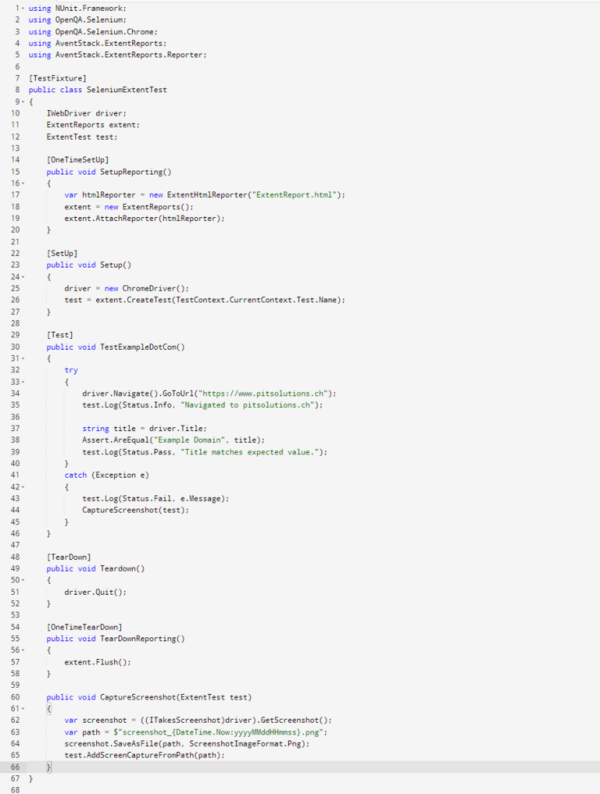
Once the tests are executed, ExtentReports generates a comprehensive HTML report showing test automation status (passed/failed), steps executed, and any screenshots captured during failures.
Conclusion
Integrating test automation within your CI/CD pipeline enables automated test execution, ensures environment consistency through Docker, and leverages cloud testing platforms – all of which contribute to enhanced software development quality. Whether you’re using Jenkins, Azure DevOps, or GitLab CI, the right integration strategy streamlines development and improves test coverage.
At PIT Solutions, we’ve successfully implemented these automation testing practices in projects such as Frontiers, Sharjah Police, WhoIAm, STMS, Bibus, Saferpay (ODDO & Magento), Tradingzone, and Inckd. Our deep expertise in software testing and test automation has strengthened our automation team, resulting in a robust framework that maximizes efficiency and accelerates testing processes.
This integrated approach has improved testing efficiency, facilitating faster defect identification and resolution, and ultimately enhancing software reliability and performance. By adopting test automation within your CI/CD pipeline, you empower your team to deliver faster, more dependable software. Embracing these best practices can transform your testing processes and elevate your overall development efforts.

Sabareesh Gopi M P
Sabareesh Gopi is a seasoned Associate Test Architect with over 12 years of experience in software testing, specializing in Selenium with both C# and Java. Passionate about implementing robust testing frameworks and optimizing CI/CD pipelines, he has a proven track record of enhancing software quality through effective automation strategies. Sabareesh is dedicated to sharing his expertise in test automation and CI/CD best practices, helping teams achieve higher efficiency and reliability in their software delivery processes. Connect with him on LinkedIn to explore more of his insights and contributions to the field.