Imagine your database is like a messy closet. Over time, it fills up with outdated records, old logs, and forgotten files. This clutter doesn’t just look bad — it slows down performance, increases costs, and makes maintenance harder.
That’s where Azure Data Factory (ADF) comes in. With the right data integration and data archiving strategy, you can keep your systems lean, fast, and cost-effective.
At PIT Solutions, we help organizations design scalable Azure Data Factory pipelines to automate data clean-up and modernization — without disrupting business operations. As part of our broader Legacy System Modernization services, we enable organizations to modernize data workflows while extending the life and value of existing systems.
What Is Azure Data Factory?
Azure Data Factory is a fully managed, cloud-based data integration service from Microsoft Azure that allows you to create, schedule, and monitor data workflows without managing infrastructure.
Key characteristics:
- Fully managed service – Microsoft handles servers, OS, scaling, availability, and security.
- Serverless architecture – Automatically scales resources based on workload.
- Low-code / no-code environment – Build ETL and ELT pipelines visually.
- Enterprise-grade reliability – Built for production workloads.
This makes Azure Data Factory pipelines ideal for automating recurring tasks like data ingestion, transformation, and archiving.
Why Data Archiving Matters for Modern Databases
Keeping all historical data in your primary database may feel safe — but it comes at a cost.
Benefits of data archiving:
- Performance – Smaller tables mean faster queries and reports.
- Cost optimization – Archive rarely accessed data to lower-cost storage.
- Compliance – Retain required records without burdening live systems.
- Operational clarity – Know exactly where historical data lives.
A smart data archiving strategy ensures your database works for today — not yesterday.
Key Features of Azure Data Factory
Azure Data Factory goes beyond simple data movement. It enables end-to-end data integration across your ecosystem:
- Move data between databases, files, and cloud storage
- Transform data (clean, filter, enrich, reformat)
- Schedule and automate workflows
- Integrate on-premises and multi-cloud data
- Orchestrate ML pipelines (Azure ML, Databricks)
- Publish analytics to Power BI
- Monitor pipeline execution and failures centrally
Core Components of Azure Data Factory
| Part | What It Does | Example |
| Pipeline | A workflow (like a to-do list for your data). | "Back up customer orders every Friday." |
| Activity | A single task in the workflow. | "Copy last month’s sales to archive." |
| Dataset | A reference to your data (like a shortcut). | "The ‘Orders’ table in SQL Server." |
| Linked Service | A connection to a database or storage. | "The login details for your SQL database." |
| Trigger | What starts the workflow (time or event). | "Run this at midnight every Sunday." |
These components work together to create reliable, repeatable Azure Data Factory pipelines.
Azure Data Factory connectors
Azure Data Factory offers 90+ built-in connectors, making enterprise data integration simple and scalable.
1. Relational Databases (SQL & NoSQL)
- Azure SQL Database – Widely used for structured data storage and analytics.
- SQL Server – On-premises and cloud-based SQL Server integration.
- MySQL – Popular open-source relational database.
- PostgreSQL – Another widely used open-source RDBMS.
- Oracle – Enterprise-grade database integration.
- Cosmos DB (NoSQL) – For scalable, low-latency NoSQL data.
2. Cloud Data Warehouses
- Azure Synapse Analytics – Integration for large-scale analytics.
- Snowflake – Popular cloud data warehouse.
- Amazon Redshift – For AWS-based data warehousing.
- Google BigQuery – GCP’s analytics data warehouse.
3. File & Blob Storage
- Azure Blob Storage – For unstructured data (CSV, JSON, Parquet, etc.).
- Azure Data Lake Storage (Gen1 & Gen2) – Big data and analytics storage.
- Amazon S3 – AWS-based object storage.
- Google Cloud Storage – GCP’s object storage.
- SFTP/FTP – For file-based data transfers.
4. SaaS & Business Applications
- Salesforce – CRM data integration.
- Dynamics 365 – Microsoft’s ERP/CRM system.
- SAP (ECC, S/4HANA, BW) – Enterprise ERP data.
- SharePoint/OneDrive – Document and collaboration data.
- Office 365 – Email, Excel, and other Microsoft 365 data.
5. Big Data & Analytics
- Azure Databricks – For advanced analytics and ML.
- Apache Spark (via HDInsight or Databricks) – Big data processing.
- Hadoop (HDFS, Hive) – Legacy big data systems.
6. Streaming & Event-Based Data
- Azure Event Hubs – Real-time event ingestion.
- Azure IoT Hub – IoT device data.
- Kafka – Distributed event streaming.
7. Other Enterprise Systems
- OData – Open protocol for RESTful APIs.
- HTTP/REST API – Custom API integrations.
- Webhooks – Event-driven data capture.
How to Automate Data Archiving Using Azure Data Factory
Scenario: Move orders older than 2 years from your live database to an archive.
Step 1: Plan Your Archive
- What data to move (e.g., orders before 2022)
- Archive destination (Azure Blob Storage, cold SQL DB, Data Lake)
- Frequency (monthly or quarterly)
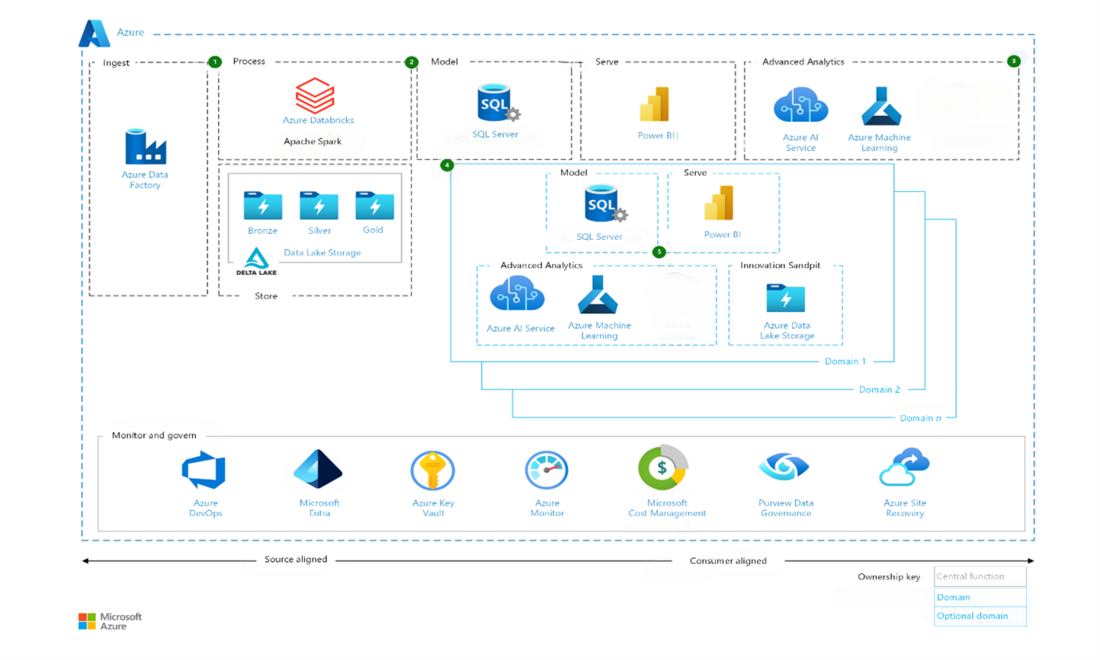
Step 2: Connect to Your Data
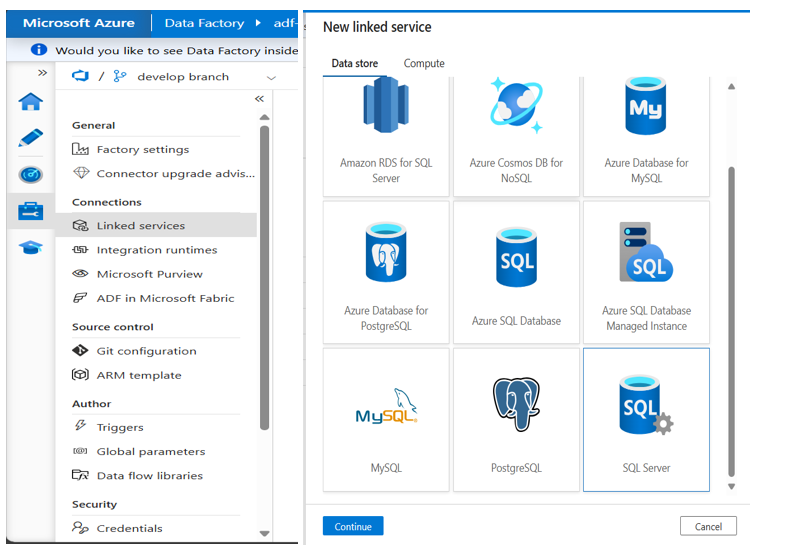
Create Linked Services for:
- Source database (live system)
- Target archive storage
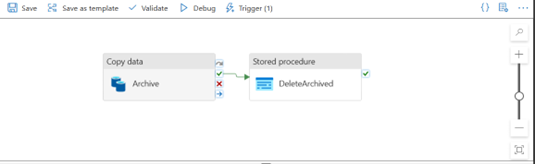
Step 3: Build the Workflow
- Identify old records using a SQL query
- Copy data to the archive
- Optional cleanup – delete archived records only after validation
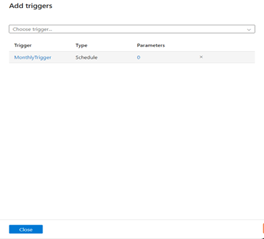
Step 4: Schedule the Pipeline
- Use time-based triggers (e.g., monthly)
- Enable alerts for failures or anomalies
Step 5: Monitor & Validate
- Track execution in ADF monitoring
- Verify archived data before deleting from source
Best Practices for Azure Data Archiving
- Move data in small, manageable batches
- Always test pipelines before production
- Maintain backups prior to deletion
- Log archived records for traceability
- Use retry and failure handling in pipelines
Why Choose Azure Data Factory
Azure Data Factory simplifies data integration and archiving by combining:
- Automation
- Scalability
- Enterprise security
- Visual development
- Multi-cloud connectivity
With the right implementation, you reduce operational risk while improving performance and cost efficiency.
At PIT Solutions, we specialize in designing production-ready Azure Data Factory pipelines tailored to your data landscape — from initial setup to optimization and governance.
Final Thoughts
Azure Data Factory removes the pain of manual exports, fragile scripts, and forgotten cleanups. By automating data archiving, you can:
- Keep systems fast
- Reduce storage costs
- Stay compliant
- Scale confidently
If you’re planning to modernize your data platform or need expert guidance on Azure Data Factory implementation, PIT Solutions is here to help.
👉 Let’s talk about building reliable, scalable data pipelines that grow with your business.

Arif Mohammed